
GMAO
Industrial maintenance, from breakdown to KPI
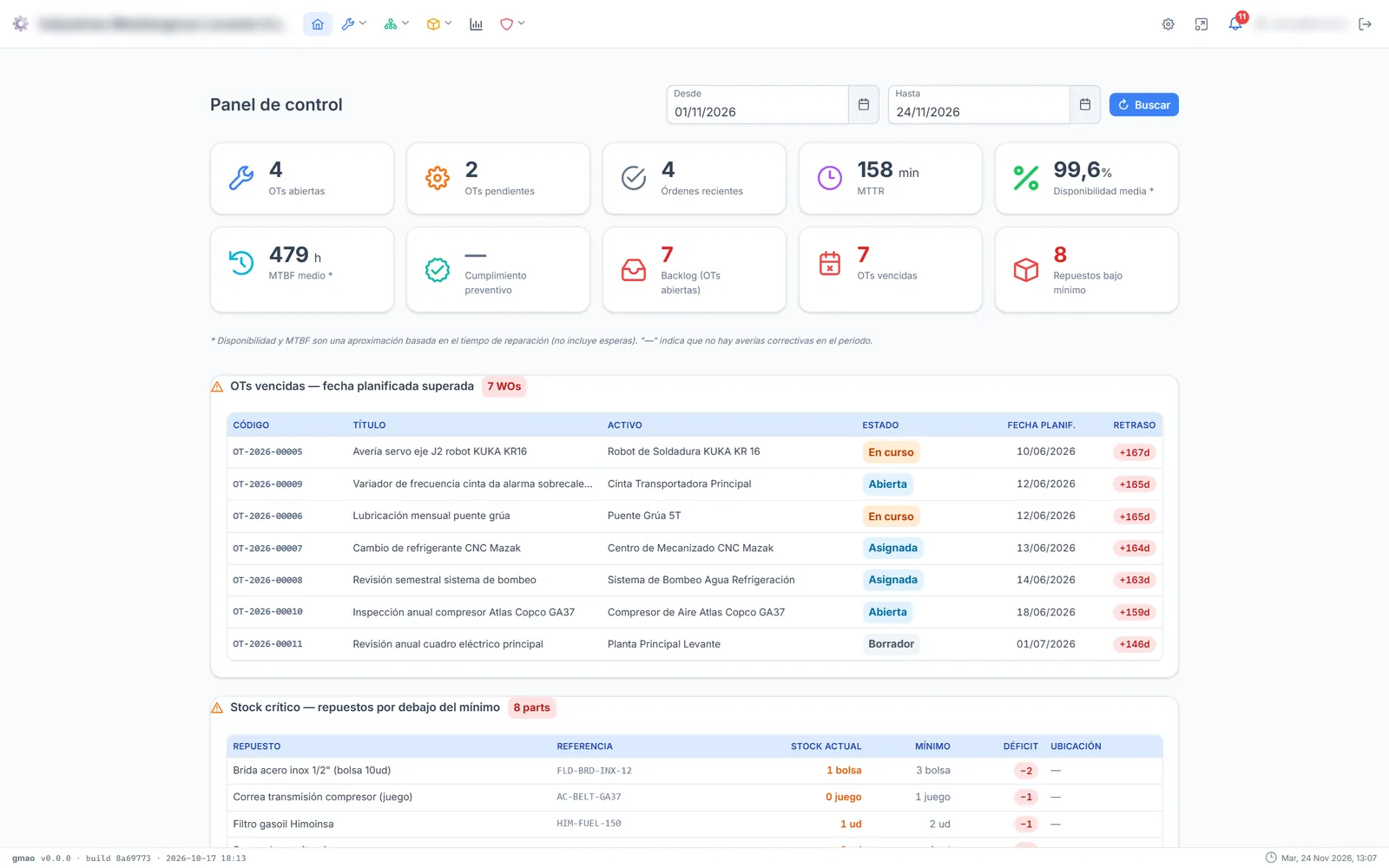
Web application for industrial maintenance management: assets, work orders, automatic preventive maintenance, spare-parts store and purchasing. Every job is linked to its equipment and feeds the availability, MTBF, MTTR and cost indicators.
- Automatic preventive maintenanceGenerates preventive work orders by calendar or when a meter reaches its threshold.
- Complete work ordersFrom draft to closure, with assignment, checklist, per-technician time clock and comments.
- Store and purchasingStock with movements, replenishment suggestions and orders sent by email or electronically.
- Shop-floor safetyWork permits with isolation by energy type and inspection routes with stops.
- server modules
- 25
- roles
- 5
- tables
- 35
- languages
- 2
- Technology
- Angular 21 · PrimeNG 21 · NestJS 11 · TypeScript · TypeORM · PostgreSQL · Chart.js · pdfmake · Jest · Playwright

 eRRAD
Visual RAD environment for Rust + egui.
 eRetroRAD
Free Pascal RAD IDE with several platforms in one: MS-DOS, Windows x64, Android and Linux x64.
 ePasIDE95
Classic-style text IDE for Free Pascal: syntax-highlighting editor, compile and jump to…
 eFlutterRAD
Delphi-style RAD for Flutter: forms designed with the mouse over real widgets, a property…
 eDOSRAD
RAD IDE for MS-DOS (386+) programs in Free Pascal: text mode or VGA/SVGA graphics with…
 eWin64RAD
RAD IDE for Windows x64 programs in Free Pascal with ImGui windows: forms, tables, charts,…
 eLinuxRAD
RAD IDE for Linux x64 programs (any distribution, glibc 2.28+) in Free Pascal with ImGui…
 ePlataformas
Retro platform game editor: layered levels, objects, F9 playtesting and a portable .exe build.
 eAudioPlay
Quality-first audio player with bit-perfect playback, DSP, analysis and conversion to FLAC…
 eMusicDone
Sample-based multitrack music production with a built-in library.
 groovebox
Groovebox with drum machines and synthesizers, pattern sequencer and example songs.
 eMusicCat
Music catalogue: reads tags without modifying them, fetches missing covers from MusicBrainz,…
 eDeckSoundBox
4-track tape recorder with drum machine (classic-style drums and acid bass): punch-in,…
 eModel3D
Simple yet powerful 3D modeler inspired by trueSpace.
 eModel3DPlus
3D modeler and animator with hierarchies and layers, inspired by Softimage 3D.
 Pnumbra
RAW developer: basic adjustments, tone curve, auto tone and export.
 eCADMobile
Workshop notebook for tablets: a calibrated photo and a pencil sketch become a dimensioned…
 eOreInvest
Tracking of metals, energy, mining and crypto markets.
 eAndSMBNav
Browser for SMB2/3 shared folders.
 eNetVigía
Local network monitoring with industrial protocols: passive listening, careful scans and alerts.
 RVMManager
VMware Workstation virtual machines: scheduled start and shutdown, VMDK disks and cold backups.
 eRemote
VNC and RDP servers in one list: each connection in its own window, fit to screen and…
 eRFileTransferSSH
Portable SFTP server and client in one app: share a folder or transfer files without…
 eDiskMon
Disk drive monitor: SMART, temperatures, usage and fill-up forecast, failure risk and system…
 eBackup
Versioned backups of the suite's folders and data: stores only what changes, restores by…
 eMonitor
Centralised machine monitoring: system, disks (SMART) and network of each client, with…
 eDCMViewer3D
DICOM viewer with MPR (axial, coronal, sagittal and oblique), GPU 3D volume, exportable…
 eSismos
Earthquake alerts for Spain and worldwide (IGN, real-time EMSC and USGS): map, list, detail…
 eRoomTune
Room tuner: measures the acoustics with the microphone (sweep, bass response, RT60), draws…
 eSonarLab
Near-inaudible sonar (18-22 kHz) and room radar for tablets: from the echoes and the…
 eRadioAlert
Radiation alerts: gamma dose rate from CSN (Spain), BfS (Germany) and Safecast stations,…
 eCie10Tutor
Learn to code with ICD-10-ES (Spanish edition of ICD-10: diagnoses and procedures).
 eLogica
From logic gates to your own CPU: circuit editor and simulator with tests, plus the ASH-16…
 eAnatomia
Topographic anatomy study tool: levels, regions, planes, directions and positions, with…
 eCienciasESO
Maths, Physics and Chemistry review for Spanish secondary school (2nd and 3rd ESO), with…
 frenchi2me
French for travelling: lessons, readings, pronunciation and a voice translator.
 neerlan2me
Dutch for travelling: lessons, readings, pronunciation and a voice translator.
 eVideoPlay
Video player built on mpv with its own ModernZ interface.
 eVideoConv
Batch video converter to M4V (MP4) using ffmpeg.
 eAudioVideoMux
Moves the audio track from one video to another into an MKV, with delay, automatic sync…
 eHandBatch
Batch video conversion with HandBrakeCLI and your own HandBrake presets.
 eModelServer
Local AI model server: chat, vision, embeddings, speech, images and music.
 eImagina
Generates and retouches images locally with Z-Image-Turbo (through eModelServer), with a…
 eHubHelper
eHub's window: the hub that lets AI assistants query and drive the suite's apps, and that…
 eProyectosIA
Status of every project and its pending tasks (kept up to date by an AI assistant), kanban,…