
ePlataformas
Retro platform game editor: layered levels, objects, F9 playtesting and a portable .exe build.
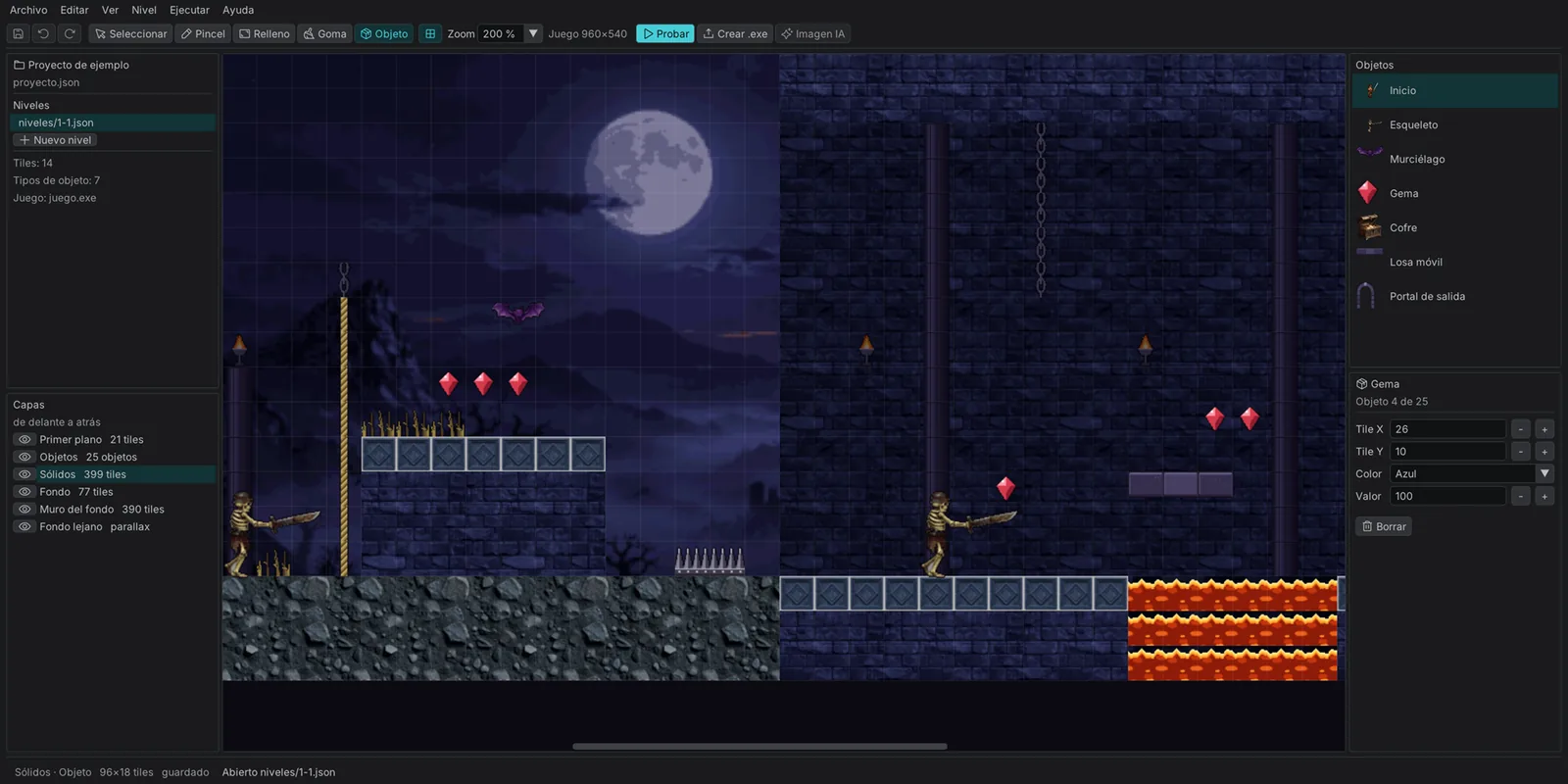
What it is
ePlataformas is an editor for retro-looking 2D platform games. The editor and the games share the same engine, so what you paint in the editor is what you play when you press F9, and «Create .exe» produces a portable game that does not need the editor. Games run at 960×540 with 32-pixel tiles and scale cleanly to large screens.
How it works
A game is a proyecto.json with its levels, the object catalogue and the artwork. Each level is a readable JSON file with six layers, from front to back: foreground, objects, solids (collision), background, back wall and far background with parallax.
The editor opens the project, draws the levels with the same textures as the game and, on saving, only rewrites what it manages (layers, size, name, physics and objects), keeping the rest of the JSON intact. Playtesting saves and launches the game at that level, or from the tile under the cursor. On export, all the data is packed into a .pak file next to the executable.
The same program also works as an MCP server, with no window. This way an AI assistant can create a project from a template, read and write levels, place objects, change the artwork, test a level with a scripted key sequence (it gets back a capture and the game state) and export the result.
Main features
- Canvas with grid, game view frame and zoom from 50 to 300 %.
- Select, brush, fill, eraser and object tools, each with its shortcut.
- Layers with visibility and counts; parallax and painted scenery shown as in the game.
- Inspector with each object's fields according to the project catalogue, or with the level's name, size and physics.
- 80-step undo and a warning about unsaved changes.
- Instant playtesting with F9, or with Shift+F9 from the cursor.
- Create .exe: a portable folder with the game, its data and an instructions file.
- Two starter templates: one with swords and fantasy, another with shooting action.
- Engine with platform physics, shooting, turrets, switch-operated doors, lifts, sound and music.
- Interface in Spanish and English, with light or dark theme.
Technology
Everything is written in Free Pascal. The engine is a set of its own units on top of SDL2, using its accelerated renderer; lights are additive textures. The editor uses Dear ImGui through cimgui, with each language's strings in separate files. Projects and levels are saved as JSON, and the exported game carries them in its own data package.
Limits
The sprite editor and AI image generation from within the editor are not there yet. The profile ground and the painted scenery are edited in the JSON or through MCP, not on the canvas. There is no area selection or copy and paste, and animated tiles are not animated on the canvas. Each game is still its own executable: new mechanics are programmed in the engine, in Pascal.
Requirements
Not part of the app: installed separately from their official websites, each under its own licence.
- Free Pascal 3.2.2
In the same category
 eRRAD
Visual RAD environment for Rust + egui.
 eRetroRAD
Free Pascal RAD IDE with several platforms in one: MS-DOS, Windows x64, Android and Linux x64. A single MCP server for all of them.
 ePasIDE95
Classic-style text IDE for Free Pascal: syntax-highlighting editor, compile and jump to error, GDB debugger, FPC help, an MS-DOS target and an MCP server.
 eFlutterRAD
Delphi-style RAD for Flutter: forms designed with the mouse over real widgets, a property inspector and events created in your code.