eRFileTransferSSH
Portable SFTP server and client in one app: share a folder or transfer files without enabling SSH on the machine.
What it is
eRFileTransferSSH is a portable SFTP server and client in a single app. It is used to move files between computers without enabling SSH or SFTP on either of them: you carry the executable, open it by hand and the computer starts offering a folder over SFTP or connecting to another one. When the window is closed, everything stops.
How it works
A selector at the top chooses the mode: Server, Client or Both, with the server in one column and the client in the rest of the window.
The server is SSH reduced to the minimum: it only offers the SFTP subsystem, with no shell, no remote commands and no port forwarding, and it is confined to one folder. Paths are resolved without being able to leave that root, drive letters are rejected and symbolic links are checked. The server key is saved so that its fingerprint does not change between sessions.
The client works with any SSH server that offers SFTP, not just this one. The server's fingerprint is trusted the first time and, if it changes, the connection stops.
It is not a service and keeps no automatic logs: activity is shown in the window and is only written to disk if the user asks for it.
Main features
- Shared folder with a read-only option, user name and password.
- A random password on every start, or a fixed one stored encrypted.
- Configurable maximum number of simultaneous clients and listening address.
- "Copy connection details": address, user, password and fingerprint on the clipboard, ready to send.
- List of who is connected and activity: connections, rejected logins, and files sent and received.
- Protection against repeated attempts: four password attempts per connection and a delay after each failure.
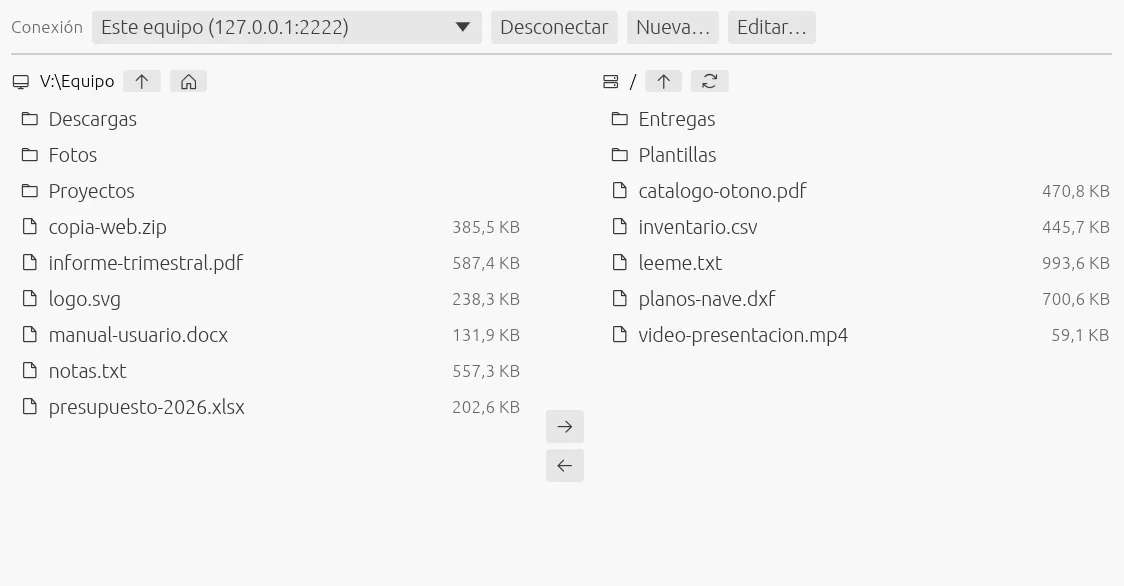
- Two-pane client, this computer and the server, with multiple selection, dragging from the file explorer and a queue with progress, speed and cancel.
- Saved connections with an encrypted password or a private key file.
- A single window: launching it again brings the one already open to the front.
Technology
Rust with egui and the house's shared theme. SSH and SFTP, on both the server and the client, are built on russh and russh-sftp over tokio. Saved passwords are encrypted with AES-256-GCM. Everything the app stores (settings, server key and passwords) goes in a folder next to the executable.
Limits
The server only accepts user name and password; public keys are not supported yet. The client cannot transfer whole folders yet, only files. If a name already exists at the destination, the file is saved with a number rather than replacing it. Encrypted passwords travel with their key inside the app folder: that is what lets you move it from one computer to another, not a safe.
In the same category
 eOreInvest
Tracking of metals, energy, mining and crypto markets.
 eAndSMBNav
Browser for SMB2/3 shared folders.
 eNetVigía
Local network monitoring with industrial protocols: passive listening, careful scans and alerts.
 RVMManager
VMware Workstation virtual machines: scheduled start and shutdown, VMDK disks and cold backups.