
What it is
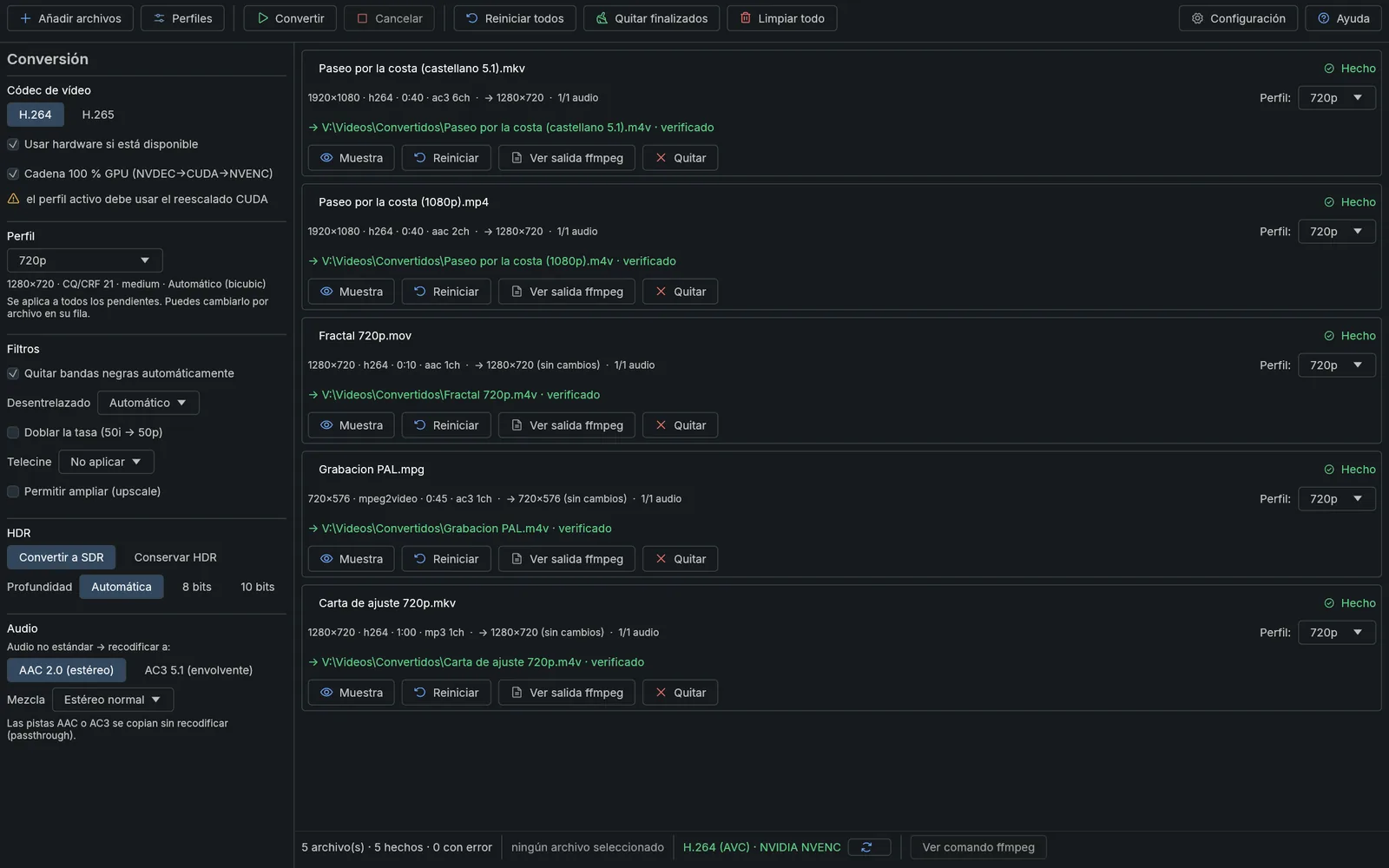
eVideoConv converts videos in batches to M4V (MP4 container) with simple resolution profiles: 480p, 720p, 1080p, 2K and 4K. It is designed to put a collection into a format that plays anywhere without wrestling with ffmpeg options. You choose the videos, adjust each profile, and the app takes care of cropping, aspect ratio, tracks and checking the result.
How it works
The interface prepares each job and a separate thread runs ffmpeg and ffprobe, one at a time, reporting progress. Before converting, ffprobe describes the video: tracks, language, HDR and aspect ratio. Output dimensions are calculated in Rust rather than with ffmpeg expressions, so the interface predicts the final size exactly. Scaling only reduces, unless enlarging is allowed.
Hardware encoders are not taken on trust just because ffmpeg lists them: each one is validated by encoding a few test frames, and those that fail are discarded. Without a compatible GPU, software encoding is used.
Output is first written as a temporary file and only renamed once it is complete and verified. A failure or a cancellation never leaves a half-written M4V or overwrites an earlier one, and two videos that would end up with the same name receive « (1)», « (2)».
Main features
- Five built-in profiles plus any you want to create, with editable preset, maximum bitrate and audio.
- Constant quality (CRF/CQ) or target bitrate per profile, H.264 or H.265.
- Hardware encoding with NVENC, QuickSync, AMF or VideoToolbox, falling back to software.
- Automatic black-bar removal by analysing several points of the video, and anamorphic videos corrected to square pixels.
- Multi-track audio: keeps the preferred language, copies AAC and AC3 as they are and re-encodes the rest to AAC 2.0 or AC3 5.1.
- Text subtitles converted to the MP4 format; image subtitles are dropped with a warning.
- HDR converted to SDR with tone mapping, or kept at 10 bits with its metadata.
- Preview of about 10 seconds with the current settings before starting the batch.
- Per-file progress with fps, speed and time remaining, and the exact ffmpeg command on view.
- Optional sending of the original to the recycle bin after verifying the output, never a permanent deletion; interface in Spanish and English and optional control from an AI assistant.
Technology
Rust with egui (eframe on OpenGL) and the house's shared theme. There is not a single line of unsafe code: the app orchestrates ffmpeg and draws the interface. Settings, profiles included, are saved to config.toml with atomic writes next to the executable. Drag and drop of files or folders, single instance and built-in help. Assistant control can only view the queue, add videos, start and cancel: it does not change settings or touch the originals.
Limits
Image subtitles (PGS, DVD, DVB) and those in formats it cannot convert do not fit in MP4 and are dropped. Black-bar detection chooses the most conservative crop, so a video with changing bars may keep part of them. The diagnostic output and ffmpeg's own messages are not translated.
Requirements
Not part of the app: installed separately from their official websites, each under its own licence.
- ffmpeg, from ffmpeg.org
 eVideoPlay
Video player built on mpv with its own ModernZ interface.
 eAudioVideoMux
Moves the audio track from one video to another into an MKV, with delay, automatic sync detection and AAC/AC3 conversion.
 eHandBatch
Batch video conversion with HandBrakeCLI and your own HandBrake presets.