eRoomTune
Room tuner: measures the acoustics with the microphone (sweep, bass response, RT60), draws the room and its modes and gives simple advice on speaker and listening position and treatment. Supports calibrated microphones (UMIK/miniDSP).
What it is
eRoomTune is a room tuner. It measures the acoustics of the room with the microphone and explains, in plain language, where to put the speakers and the seat and which treatment is worth it: bass traps, panels or nothing at all. It is meant for people who listen to music or mix at home and want better sound without knowing the theory.
How it works
The app has two parts. The Flutter interface shows the room, the measurement and the analysis. The calculations are done by a Rust core that receives a JSON request through FFI and returns the answer in JSON too.
A measurement follows these steps:
- The core plays silence, an exponential sine sweep and a silent tail, and records the microphone at the same time. The initial silence is used to measure the background noise.
- It checks the level and warns if the microphone clips, has little headroom or picks up nothing.
- By deconvolution it obtains the impulse response, which is aligned on its peak, so the system latency does not matter.
- From it, it derives the frequency response smoothed to 1/6 octave and the RT60 per octave (Schroeder, T30, T20 and EDT), with the background noise subtracted.
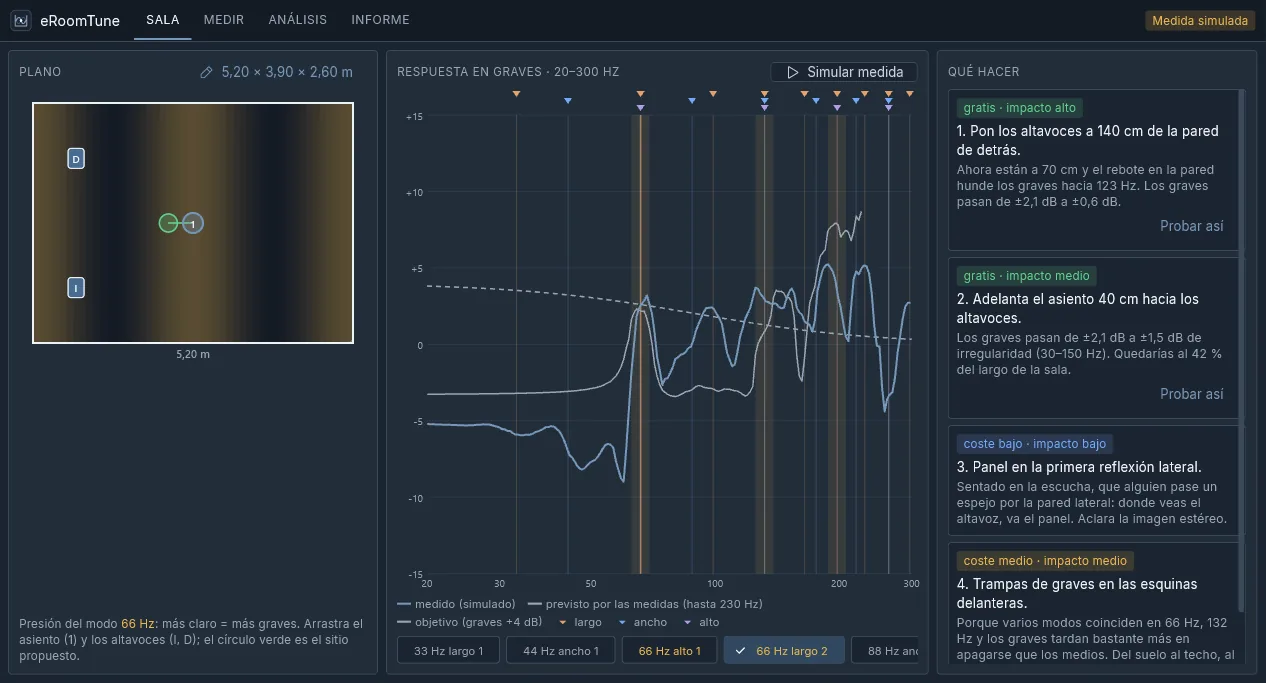
From the room dimensions, the core computes the modes of a rectangular room (axial, tangential and oblique), where they coincide, the predicted bass response for the speaker and listener positions, and the reflection from the wall behind the speakers. With all that it ranks the advice by cost and impact: free changes first, such as moving the armchair or the speakers, then treatment.
Main features
- Room plan with the pressure of each mode; the seat and speakers can be dragged and the prediction updates.
- Search for the best listening position and the speakers' distance from the front wall.
- Advice ranked by cost (free, low, medium) and impact.
- Microphone measurement: choice of input and output, left, right or both speakers, level, duration and live meter.
- Calibration files for measurement microphones in miniDSP or UMIK format.
- Smoothed frequency response and RT60 per octave.
- Impulse response saved as WAV.
- "Simulate measurement" mode, which runs the whole process on a synthetic room.
Technology
Interface in Flutter and Dart with the shared theme of the in-house apps. Core in Rust: realfft for the transforms, cpal to play and record at the same time, hound for WAV files and serde for the JSON exchange. The only unsafe code is at the FFI boundary. To measure, the app asks for an unprocessed microphone: on iOS it sets the audio session to measurement mode, and on Android it opens audio without automatic gain control.
Limits
It assumes a rectangular room: in L-shaped rooms or under sloping ceilings, the modes and the bass prediction are approximate. The microphone of a tablet or laptop is good enough to get your bearings; reliable measurements need a measurement microphone with its calibration file. Each analysis corresponds to a single measuring point.
Supports calibrated UMIK or miniDSP microphones (not included).
In the same category
 eOreInvest
Tracking of metals, energy, mining and crypto markets.
 eAndSMBNav
Browser for SMB2/3 shared folders.
 eNetVigía
Local network monitoring with industrial protocols: passive listening, careful scans and alerts.
 RVMManager
VMware Workstation virtual machines: scheduled start and shutdown, VMDK disks and cold backups.