eRemote
VNC and RDP servers in one list: each connection in its own window, fit to screen and per-server keyboard.
What it is
eRemote brings remote desktop servers, both VNC and RDP, together in one list. You pick one and it opens in its own window with the right protocol. Each server keeps its own settings: display, keyboard, compression and how to sign in. It is meant for anyone who works daily with several computers, virtual machines or servers from the same desk.
How it works
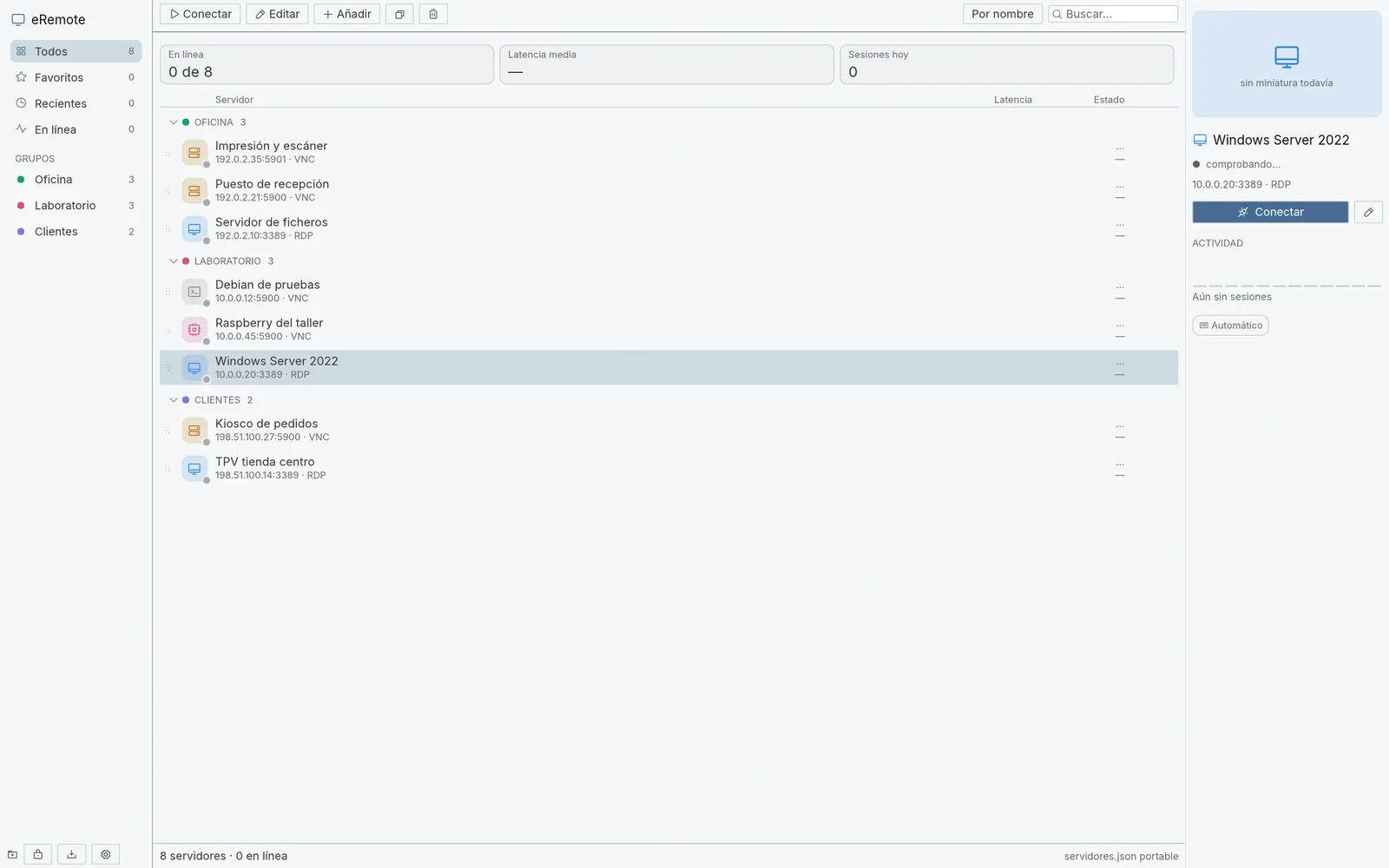
The launcher shows servers in groups, with a status dot showing whether they respond, their latency and a small chart of the latest checks. When you connect, the launcher runs itself again as a separate process for that session: if one connection hangs, the others keep working.
- VNC uses its own client written from scratch, compatible with protocol versions 3.3 to 3.8, with the usual encodings (from Raw to ZRLE and Tight), remote resolution changes and continuous updates.
- RDP is embedded through IronRDP: TLS, NLA network authentication with NTLM, clipboard and per-server resolution.
Passwords are kept in a vault encrypted with AES-256-GCM inside the app folder, which can be protected with a master password. Each session receives its key without it being written on the command line. RDP certificates and SSH keys are trusted the first time and, if they change, the connection stops and asks.
Main features
- List in collapsible groups, favourites, sorting by last use, quick search and drag to move servers.
- One window per connection with fit to window, actual size, full screen, screenshots and view-only mode.
- Session bar with resolution, latency, keyboard echo, updates per second and throughput.
- Per-server keyboard: local characters, physical keys or the server's layout, with editable tables for several languages and a special keys menu.
- VNC authentication by password, VeNCrypt with TLS, and the UltraVNC and RealVNC variants.
- RDP clipboard for text, images and files in both directions.
- SSH tunnel for VNC and RDP, and a file panel over SFTP with a queue and progress.
- Automatic reconnection with increasing delay, and Wake-on-LAN to wake the machine.
- Server import from
.vncand.rdpfiles. - Optional control by an AI assistant through eHub: status, list and opening sessions, with no access to users or passwords.
Technology
Rust with egui and the house's shared theme. RDP uses IronRDP on rustls; SSH and SFTP use russh; the vault uses AES-256-GCM with the master password derived through Argon2id. It is portable: list, settings, passwords, screenshots and keyboards live in the application folder.
Limits
RDP has no Kerberos, sound or drive redirection. VNC does not support the authentication specific to Apple computers. The file panel cannot transfer whole folders yet. The vault travels with the app folder: without a master password, whoever copies the folder also takes the key.
In the same category
 eOreInvest
Tracking of metals, energy, mining and crypto markets.
 eAndSMBNav
Browser for SMB2/3 shared folders.
 eNetVigía
Local network monitoring with industrial protocols: passive listening, careful scans and alerts.
 RVMManager
VMware Workstation virtual machines: scheduled start and shutdown, VMDK disks and cold backups.