What it is
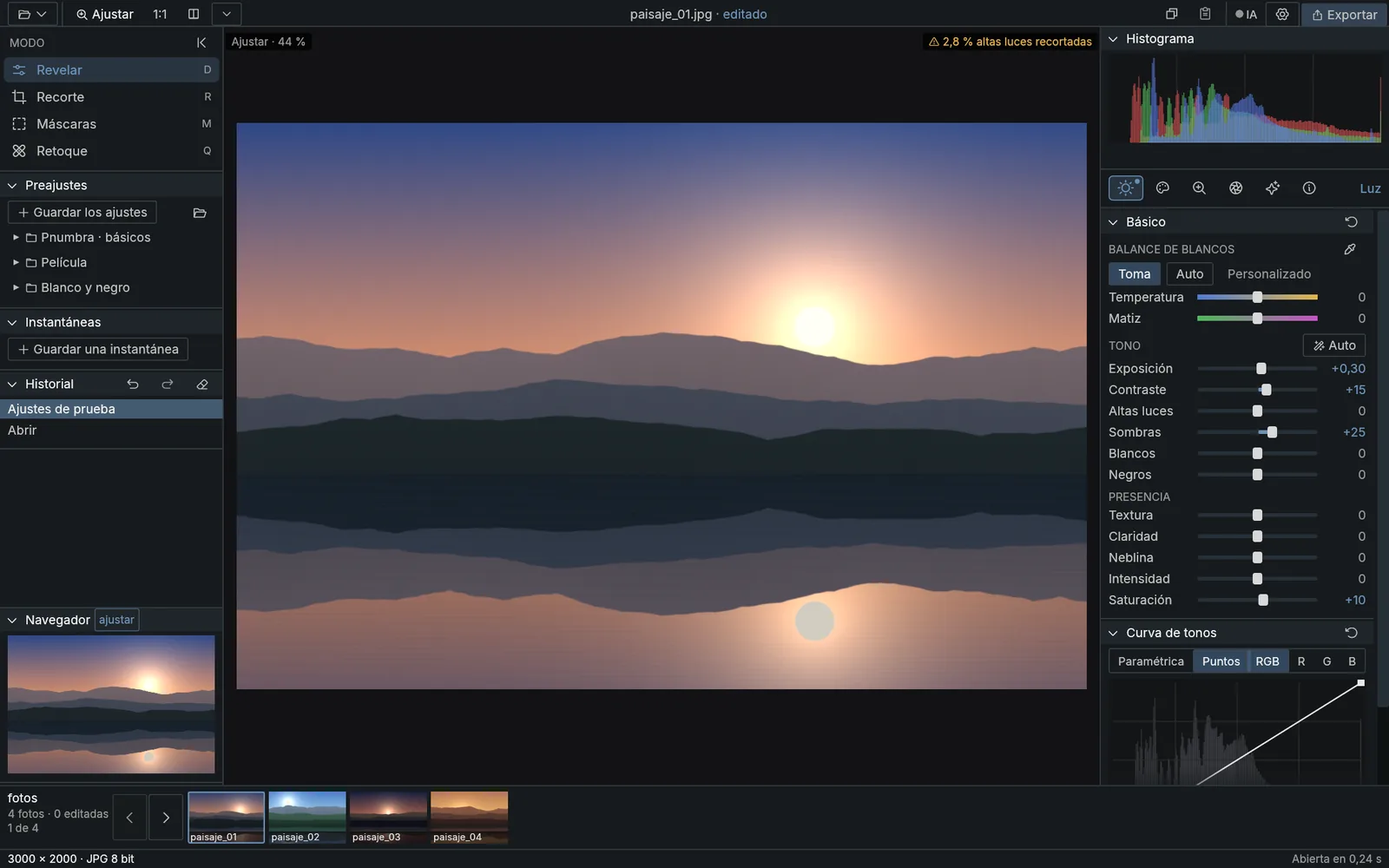
Pnumbra is a RAW photo developer. It has no catalogue: you open a photo or a folder and work on what is on the disk. Development is non-destructive: the RAW file is never touched, and each photo's settings are saved in a small sidecar file next to it, with its history and snapshots. It also opens JPEG, PNG and TIFF.
How it works
The app has three parts: RAW and thumbnail reading, a core holding the settings and a reference development on the CPU, and the interface.
The preview is developed on the GPU with a shader that performs exactly the same calculations as the CPU development. On export, the photo is developed at full resolution on the CPU, in a separate thread with progress shown. Automated tests develop the same image both ways and check that they differ by no more than 1/255, so what you see is what you export.
The AI features are optional: subject and background masks and AI noise reduction are computed by eModelServer, the house's local model server. If it does not respond, those buttons are greyed out and explain why.
Main features
- Automatic tone and white balance, an eyedropper and colour temperature in kelvin based on the shot's own.
- Parametric and per-channel point tone curve; texture, clarity and dehaze.
- Colour mixer by bands, black and white with its own mixer, colour grading with wheels and primary calibration.
- Noise reduction and sharpening, lens correction with profiles, chromatic aberration and defringing.
- Cropping with guides, automatic straightening and perspective correction from detected or drawn lines.
- Up to 8 combinable local masks (brush, linear, radial, colour range and luminance range), with their own adjustments and local detail.
- Retouching: heal or clone spots, fill along a stroke, red eye and dust detection.
- Effects: vignette, grain, glow, creative
.cubeLUTs, blurs, borders and duotone; user presets and per-photo snapshots. - Before and after comparison, copy and paste settings, and a history with undo and redo.
- Export to JPEG, TIFF, PNG, WebP, AVIF and JPEG XL, in sRGB, Display P3 or Adobe RGB, with the shot data but without GPS or serial numbers.
Technology
Rust with egui for the interface and wgpu for GPU development. RAW reading uses the rawler library; lens correction uses Lensfun profiles. Heavy CPU work is spread in parallel. The app is portable: its preferences, presets and LUTs live in a folder next to the executable. Optionally, an AI assistant can drive it through eHub, without exporting or deleting anything.
Limits
It does not manage a library: there are no star ratings, colour labels or keywords, and the export mark is not saved. Snapshots are named automatically. Subject and background masks and AI noise reduction need eModelServer running with its models, which are used but not included.
Requirements
Not part of the app: installed separately from their official websites, each under its own licence.
- eModelServer and its models, only for the AI features (masks and noise reduction)
In the same category
 eModel3D
Simple yet powerful 3D modeler inspired by trueSpace.
 eModel3DPlus
3D modeler and animator with hierarchies and layers, inspired by Softimage 3D.
 eCADMobile
Workshop notebook for tablets: a calibrated photo and a pencil sketch become a dimensioned 2D drawing, with layers, blocks and export to DXF, SVG, scaled PDF and eModel3D.