
GMAO
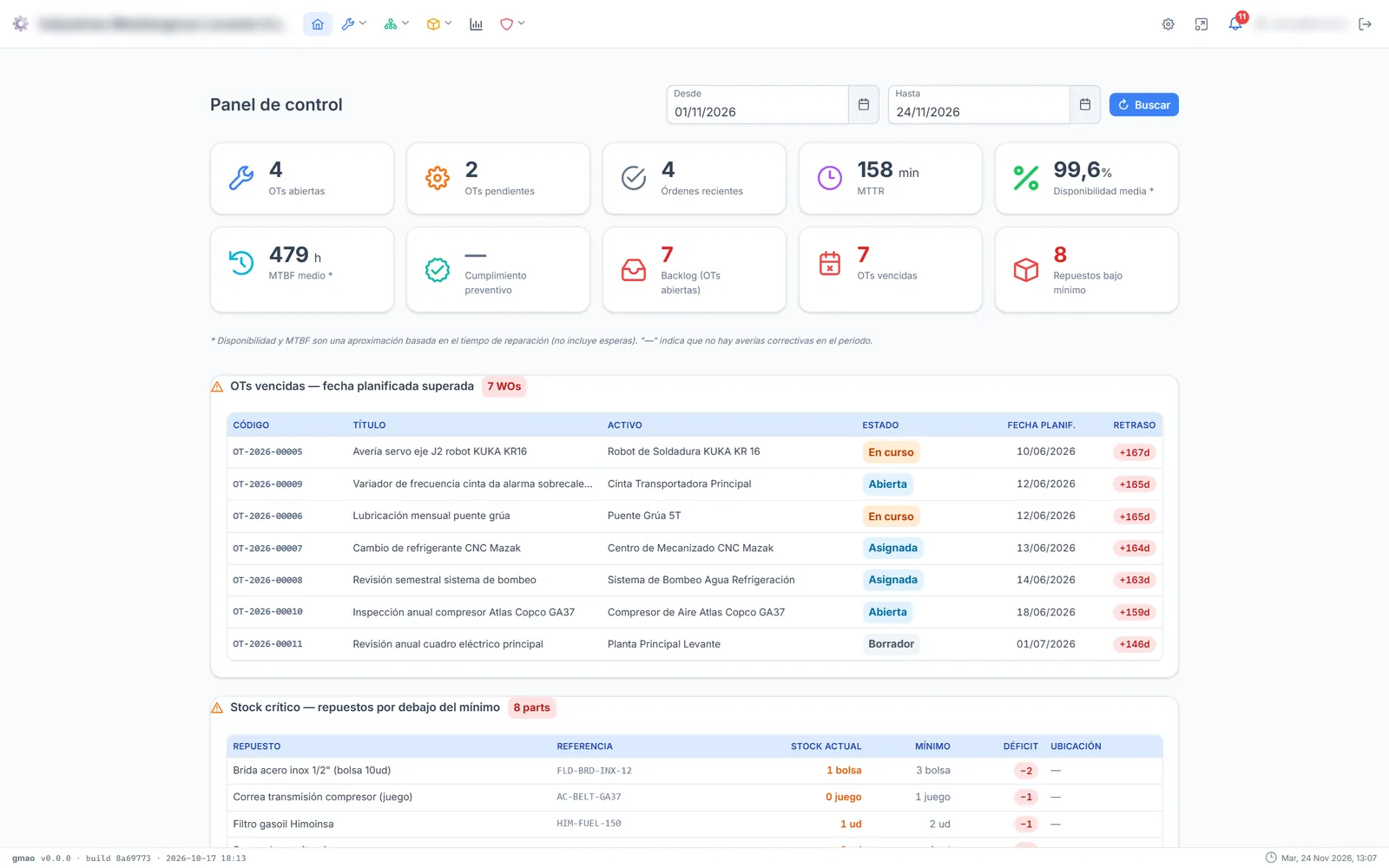
Web application for industrial maintenance management: assets, work orders, automatic preventive maintenance, spare-parts store and purchasing. Every job is linked to its equipment and feeds the availability, MTBF, MTTR and cost indicators.
What it is
GMAO is a web application for industrial maintenance management (a CMMS). It brings a plant's assets, work orders, preventive maintenance, spare-parts store and purchasing together in one place, with the information each profile needs: whoever plans, whoever repairs on the shop floor, whoever runs the office and whoever simply reports a breakdown.
It is designed to get maintenance out of spreadsheets and notebooks. Every job is linked to its equipment, with its time, its spare parts and its comments, and from there come the indicators that support decisions: availability, mean time between failures, mean time to repair, costs and preventive compliance. The interface is available in Spanish and English.
How it works
The application has two parts. The server is a REST API in NestJS on PostgreSQL, with the schema described in TypeORM entities and migrations. The client is a single-page Angular application that talks to that API using a JWT token.
The data model separates every record by organisation: the organisation identifier always comes from the token and every query filters by it. The first sign-up creates the organisation and its administrator; after that, users request access and the administrator approves them, or registers them directly.
A good deal of the work happens without anyone asking for it:
- Every morning, the scheduler reviews calendar-based maintenance plans and generates the preventive work orders that fall due.
- Every half hour it checks meter-based plans (running hours, cycles, kilometres…) and opens a work order when the reading reaches the threshold.
- Every hour it looks for overdue work orders and spare parts below their minimum, and every day it warns about expiring warranties. Alerts arrive in the application's bell and, if email is configured, by email.
Meter readings can also arrive from sensors or other systems through an ingestion endpoint with an API key, separate from the sign-in used by people.
Modules
- Assets: hierarchical equipment tree with record, images, spare-parts list, meters and a timeline history.
- Work orders: corrective and preventive, with priority, assignment, checklist, time entries and comments.
- Maintenance plans: preventive by days, weeks or months, or by meter readings, with their own checklist.
- Calendar: planned work orders and plans laid out over time.
- My tasks: what the signed-in user has pending.
- Requests: breakdown reports or requests with a conversation between whoever opens them and whoever resolves them.
- Work permits: LOTO-style isolation by energy type (electrical, pneumatic, hydraulic, chemical, mechanical, thermal).
- Inspection routes: rounds with ordered stops and executions that are completed or aborted.
- Spare parts: store with minimum stock, incoming and outgoing movements, images, suppliers per part and CSV import.
- Purchase orders: orders with lines, sending, receipt and cancellation, plus replenishment suggestions based on low stock.
- Incoming orders: orders received electronically from another installation, to be dispatched or cancelled.
- Suppliers: contact details, ordering email and electronic ordering endpoint.
- Contractors: external companies involved in maintenance.
- Warranties: equipment warranties with expiry alerts.
- Documents: files attached to assets and other records, with versions and expiry date.
- Failure codes: catalogue for classifying breakdowns, with an optional initial load.
- Reports: KPIs, costs, failure analysis, per-technician report, preventive compliance, backlog ageing, spare-parts consumption, zones and MTBF trend.
- Notifications: in-app alerts with history and read marking.
- Users: registrations, approval of access requests, workload and theme preference.
- Administration: organisation details, logo for documents, outgoing email, API keys and system status.
Main features
- Full work-order life cycle: draft, open, assigned, in progress, closed or cancelled, with a per-technician time clock.
- Automatic preventive maintenance by calendar or by meter, with no manual intervention.
- A QR code per asset: scanning it opens the asset's record, going through sign-in first if needed.
- Stock control with recorded movements and blocking of issues that would leave the store negative.
- Assisted replenishment: the application suggests what to order and from whom, and generates the purchase orders.
- Orders sent to the supplier by email or through an electronic endpoint; receipt goes into the store.
- Reports with charts and export to PDF and Excel; work-order sheet in PDF with the organisation's logo.
- Validation of Spanish tax identifiers (NIF, NIE and CIF) in fiscal data.
- Contextual help: a button opens, in a floating window that does not cover the screen, the manual section for the current module in the active language. The manual is also available as a PDF in Spanish and English.
- Light and dark theme, selectable colour palette and full-screen mode.
Security and quality
There are five roles: administrator, engineer, technician, operator and office administration. The general rule is that everyone can look up what they need and writing is split by profile: planning and master data are for administration and engineering; shop-floor execution, for technicians; the store and purchasing, for whoever runs the office. The same policies live in the API and in the interface, which also protects each restricted route with its own guard.
Server-side protections:
- Passwords hashed with bcrypt and checked for strength when created; API keys stored as hashes, never in clear text.
- A limit on sign-in attempts per IP and email, and a global ceiling of requests per minute.
- Security headers (framing, content type, referrer, origin isolation, HSTS) and CORS restricted to the interface's origin.
- The server will not start in production without a JWT secret; tokens expire.
- Electronic ordering addresses are checked against internal and reserved networks to prevent requests being forced from the server.
- Data placed into emails is escaped; the request log does not store the query part of URLs.
- Strict validation of every request body and a global error filter with controlled messages.
- Order ingestion is idempotent: a network retry does not duplicate the order.
Keeping the token in the browser is a documented and accepted risk, with its mitigations.
The API documents itself with OpenAPI. There are 152 test cases in Jest on the server (role and sign-in guards, work-order life cycle, stock, plans, purchasing, reports, security utilities) and end-to-end tests with Supertest against a dedicated database. The interface adds unit tests with Vitest and browser tests with Playwright. A quality report highlights the interface: standalone components with no modules, no zone.js, signals, OnPush change detection in every component and lazy loading per route.
Technology
The server is written in TypeScript with NestJS 11, TypeORM and PostgreSQL, with scheduled tasks, email through Nodemailer and OpenAPI documentation. The interface uses Angular 21 with PrimeNG 21, translations with ngx-translate, charts with Chart.js, PDFs with pdfmake, spreadsheets with SheetJS and QR codes generated in the browser itself. Heavy libraries are loaded only when they are used.
Limits
There is no general audit log of actions: traceability relies on each asset's history and on the comments and time entries of work orders. Each installation is created with a single organisation. The indicators depend on work orders being opened and closed with discipline.
 eComerGes
Sales management web application that works out how much each representative earns and why, with a configurable rules engine, settlements and mobile use. It runs on Firebird 4.0 or SQLite thanks to an in-house data layer.