eCADMobile
Workshop notebook for tablets: a calibrated photo and a pencil sketch become a dimensioned 2D drawing, with layers, blocks and export to DXF, SVG, scaled PDF and eModel3D.
What it is
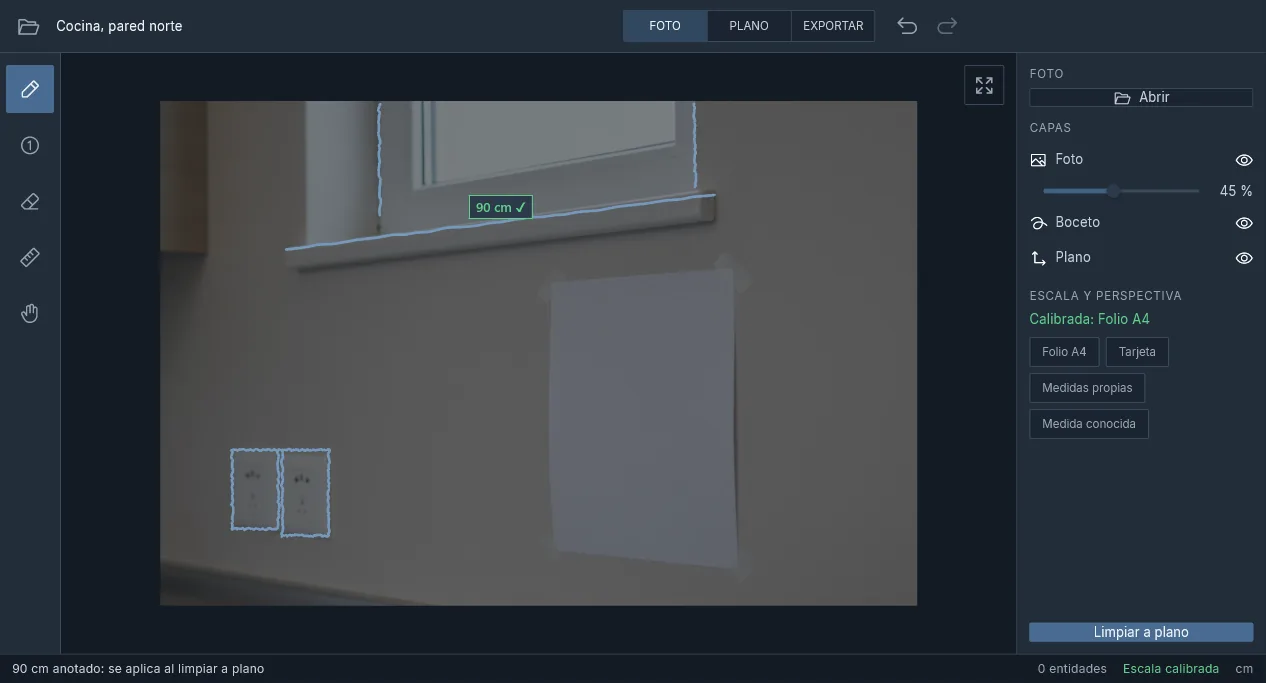
eCADMobile is a workshop notebook for tablets. You take a photo of a part, a piece of furniture or a wall, draw and dimension on top of it with the pen, and get a clean 2D drawing measured in centimetres. It is meant for taking measurements on site or in the workshop without going through a desktop CAD program.
How it works
Work starts with a photo and a calibration: you mark a reference of known size (an A4 sheet, a card, the four corners of a wall with their measurements, or a distance between two points) and the app computes a homography that corrects perspective and sets the scale. From then on everything is stored in centimetres.
You sketch freehand on the photo. When you press "Clean up to drawing", each stroke is recognised as a line, arc, circle, rectangle or polyline by least squares, snapping to 15° angles, parallels, perpendiculars and points. On the Drawing tab recognition is immediate.
Dimensions drive the drawing. A dimension solver (weighted Levenberg-Marquardt) readjusts the whole drawing when a measurement is fixed:
- whatever was snapped stays snapped;
- horizontal stays horizontal and parallels stay parallel;
- if two dimensions contradict each other, it warns you.
With a pen, fingers only pan and zoom (palm rejection); without a pen, a finger or the mouse draws. Live ink is painted on a separate layer with a small prediction of the next point to reduce lag. The document saves itself and has undo.
Main features
- Scale and perspective calibration with A4, a card, your own measurements or a known distance.
- Sketch on the photo that turns into clean geometric entities.
- Handwritten dimensions: on the tablet they are recognised on the device by ML Kit Digital Ink; if they cannot be read, the app asks for the figure.
- Simple parametric dimension solver, with a lock to release a dimension.
- Free layers with name, colour, visibility and lock; the photo can be dimmed or hidden.
- Lasso and editing: select, move, copy, rotate 90°, mirror, move to layer and delete.
- Blocks in a library shared by all drawings, placed with a tap, rotated or mirrored.
- Dimensions choose the side where they do not overlap other parts.
- Export to DXF (R12, in cm, one layer per drawing layer), full-size SVG and PDF at a standard scale on A4 or A3 with a title block.
- Recipe for eModel3D: each closed outline is extruded with the inner ones as holes, standing or lying flat and with the chosen thickness.
Technology
Written in Flutter and Dart. The core (geometry, stroke recognition, homography, document, dimensions, solver and exporters) is pure Dart, independent of the interface, with its own tests. Editor state uses Riverpod. The PDF is generated with the pdf package and handwritten figures are read with ML Kit Digital Ink, whose model is downloaded once. The interface uses the shared theme of the in-house apps.
Limits
It is a working drawing, not a full CAD system: it draws in 2D and accuracy depends on the photo calibration. Photos are corrected as a flat plane, so anything that sticks out from the wall or the part is not to scale. Handwritten figure recognition works on the tablet; on the desktop the figure is typed.
 eModel3D
Simple yet powerful 3D modeler inspired by trueSpace.
 eModel3DPlus
3D modeler and animator with hierarchies and layers, inspired by Softimage 3D.
 Pnumbra
RAW developer: basic adjustments, tone curve, auto tone and export.