eFlutterRAD
Delphi-style RAD for Flutter: forms designed with the mouse over real widgets, a property inspector and events created in your code.
What it is
eFlutterRAD is a Delphi-style RAD environment for building Flutter applications. Forms are designed with the mouse on a canvas, refined in a property and event inspector, and bound to databases through non-visual components. The result is an ordinary Flutter project on disk, which also builds without the IDE.
How it works
Each form is three files, like Delphi's .dfm and .pas: the design (.efr.json, readable text that works well with version control), the code generated from it (.g.dart, never edited) and the user's own code, with the events and the logic. The IDE only writes to the latter to add the skeleton of a new event; the rest is yours.
The canvas draws the form with the same widgets the application will use, so what you see is what you get. Each component is an object with properties (edNombre.texto = 'Ana') that repaints its widget by itself when they change, with no manual setState. Layout combines Delphi's alignment and anchors with Flutter's rows, columns and wraps, and supports variants by width: desktop, tablet and mobile.
Components are folders with a JSON descriptor. The built-in ones ship inside the IDE; third-party ones are added from pub.dev without rebuilding it, and a live preview shows the form in the real app while you design.
Main features
- Tabbed palette, canvas with handles and guides, object tree, inspector and undo.
- Standard components, containers, menus, dialogs, timer, PDF reports and data-aware controls: edit, memo, checkbox, combo, date, image, grid and navigator.
- TDataSet-style data with Firebird and SQLite connections, and real rows on the canvas at design time.
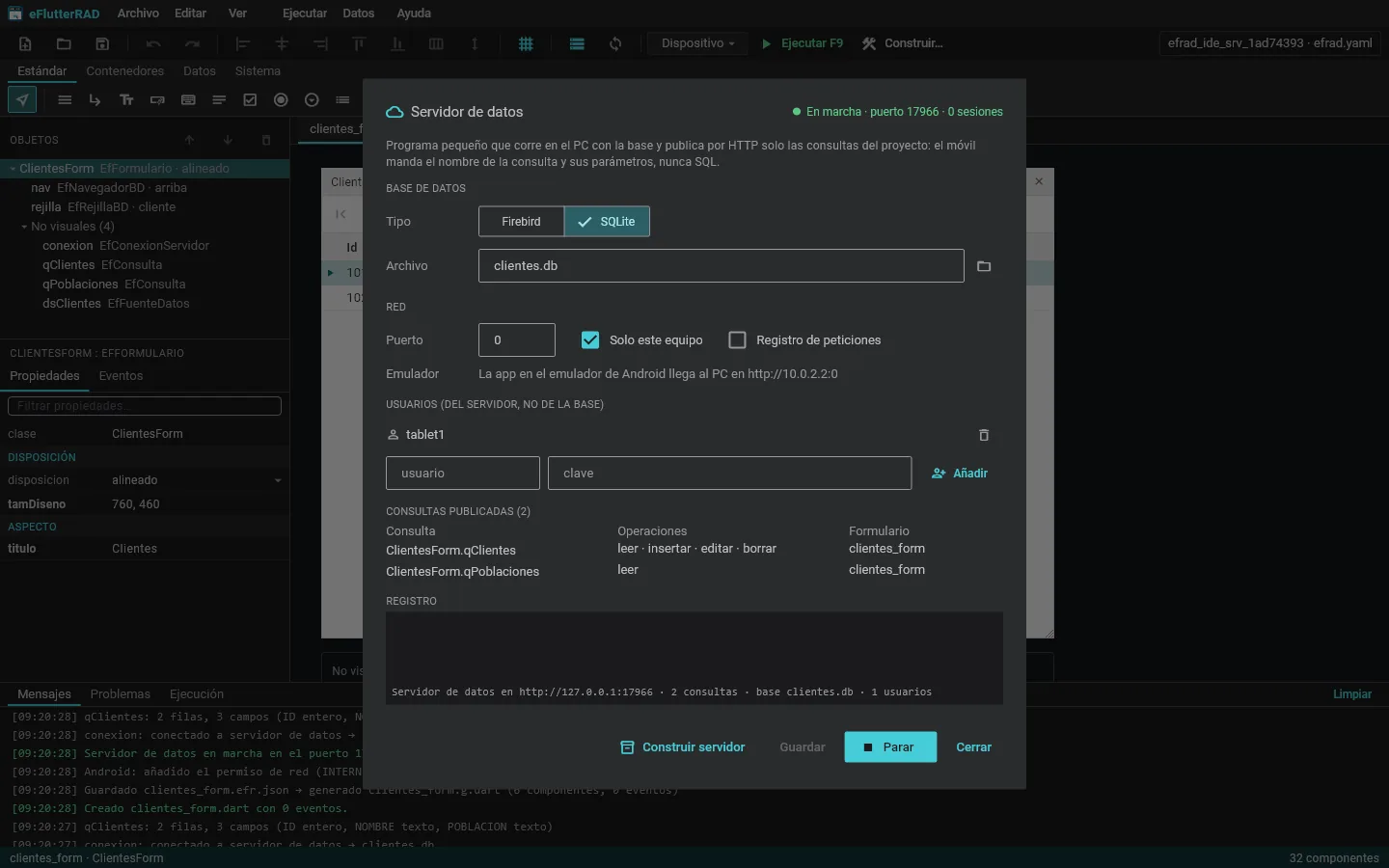
- Its own data server, which publishes only the project's queries over HTTP or HTTPS, so the phone never talks to the database directly.
- Run with F9 and hot reload on save; problems tab fed by the Dart analyser.
- Built-in code editor with the Dart language server: completion, live errors, go to definition, quick fixes and renaming together with the design.
- Debugger with breakpoints, call stack, variables and step-by-step execution.
- Build a desktop executable, APK, AAB and web, with Android signing.
- CRUD and master-detail templates that adapt to desktop and mobile.
- MCP server so an AI assistant can write forms and see them in a capture.
Technology
Written in Flutter and Dart as a workspace of several packages: the form runtime, data, the code generator (also usable from the command line), the data server, the IDE and the MCP server. The editor uses the Dart language server, and the debugger uses the Dart VM service. Reports are produced with the pdf package.
Limits
Third-party components appear on the canvas with an approximate look; the live preview gives the exact picture. Property and event names are in Spanish. Direct Firebird access is desktop-only: on Android, data goes through the data server. Building a desktop app requires a machine running that platform.
Requirements
Not part of the app: installed separately from their official websites, each under its own licence.
- Flutter SDK
In the same category
 eRRAD
Visual RAD environment for Rust + egui.
 eRetroRAD
Free Pascal RAD IDE with several platforms in one: MS-DOS, Windows x64, Android and Linux x64. A single MCP server for all of them.
 ePasIDE95
Classic-style text IDE for Free Pascal: syntax-highlighting editor, compile and jump to error, GDB debugger, FPC help, an MS-DOS target and an MCP server.
 eDOSRAD
RAD IDE for MS-DOS (386+) programs in Free Pascal: text mode or VGA/SVGA graphics with mouse, data tables, reports and QEMU with FreeDOS.