
What it is
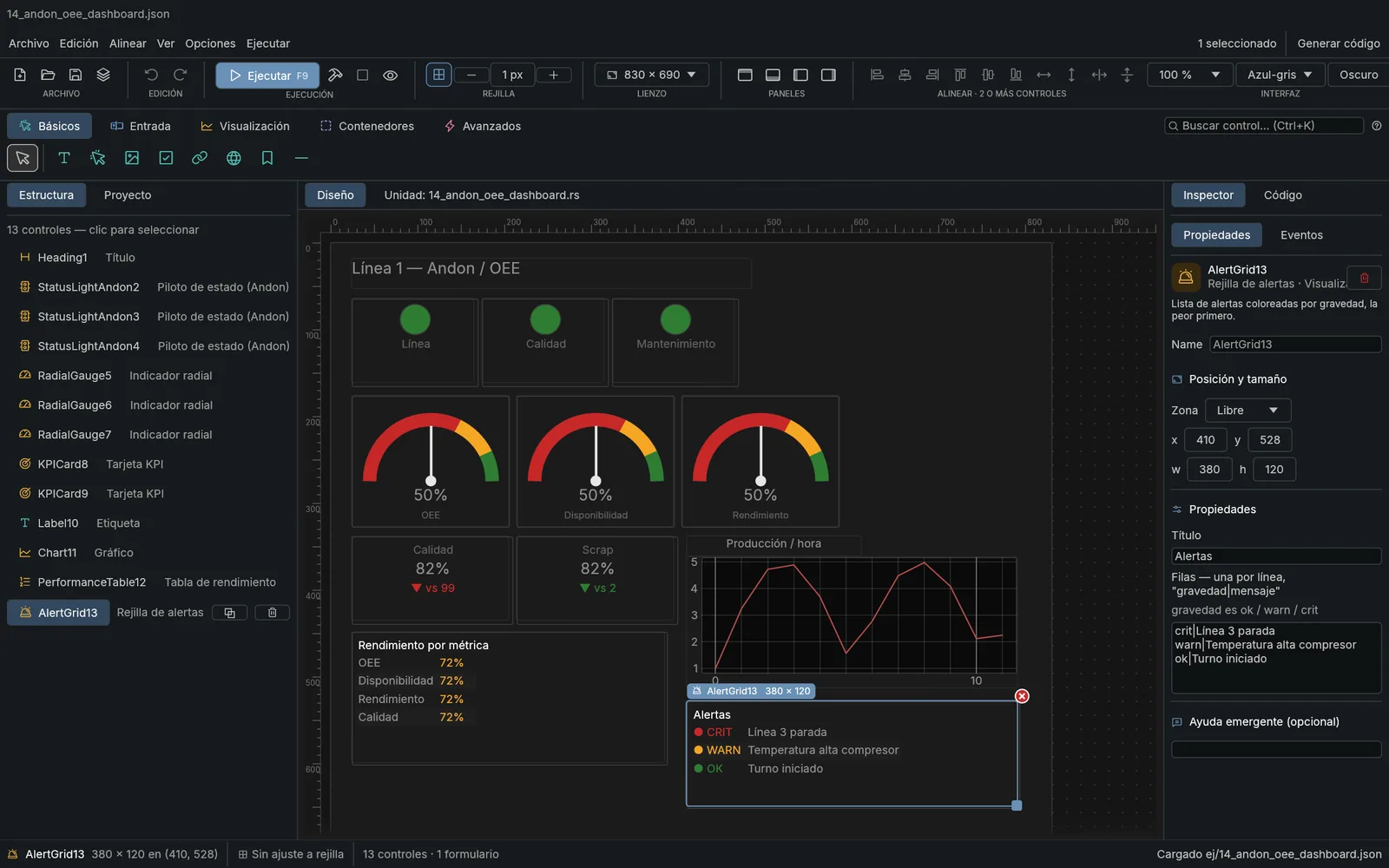
eRRAD is a visual RAD environment for building desktop applications in Rust with egui, with Delphi as its reference: component palette, form designer, object inspector, data-aware controls and compiling from within the environment. It starts from egui-rad-builder, an open-source project under the MIT licence, and extends it.
How it works
A form is a JSON file, the equivalent of a .dfm, with a .rs unit next to it that plays the role of the .pas. The unit belongs to the user: eRRAD only appends new event handlers at the end and never changes what is already there. An .errad project groups several forms and marks the main one.
When you press F9, eRRAD saves, generates the application's eframe/egui code, compiles it with cargo and runs it. The generated code includes the real unit, so errors point to its lines, and a click in the build window takes you there. Each open form is a real window that remembers its position, size and monitor.
Handlers receive the form's state, with one field per control named after the name it was given (state.saludo). From any unit you can read or change another form's state, show it, open it as a modal or close it.
Main features
- Palette of around 44 controls in the top bar, by category, with search by name.
- Canvas with grid, rulers, multiple selection, align and distribute, undo and a live preview without compiling.
- Delphi-style events:
OnClick,OnDblClick,OnChange,OnEnter,OnExit,OnShow,OnCloseQuery,OnCloseand a non-visualTimer. - Built-in unit editor (F12) with Rust highlighting, find and replace, and completion of the state fields.
- Shortcuts from RAD Studio's default keymap.
- Data-aware controls over SQLite, PostgreSQL and Firebird, plus a database explorer.
- REST, MQTT (including Sparkplug B), Modbus TCP and OPC-UA data sources, with charts, gauges and KPIs.
- Start screen with examples, recent projects and templates.
- Deploy: a
.zipwith the executable, its embedded images and whatever its database needs, after checking that it does not depend on libraries outside the system. - Optional portable kit to compile on Windows with no Rust installed and no connection.
Technology
Rust with egui and eframe, both for the environment and for the applications it generates. Highlighting with syntect, SQLite with rusqlite, and PostgreSQL and Firebird with their Rust drivers. The environment has its own theme; the canvas uses egui's stock style, which is the one the generated application will have. MIT licence.
Limits
There is no debugger. When a control is renamed, the handlers that use it are adjusted by hand, as in Delphi without refactoring. Compiling the generated applications requires Rust: the first build takes a few minutes and later ones, seconds. A modal form does not block execution: it leaves its answer in the form that opened it before closing.
Requirements
Not part of the app: installed separately from their official websites, each under its own licence.
- Rust (rustup and cargo)
In the same category
 eRetroRAD
Free Pascal RAD IDE with several platforms in one: MS-DOS, Windows x64, Android and Linux x64. A single MCP server for all of them.
 ePasIDE95
Classic-style text IDE for Free Pascal: syntax-highlighting editor, compile and jump to error, GDB debugger, FPC help, an MS-DOS target and an MCP server.
 eFlutterRAD
Delphi-style RAD for Flutter: forms designed with the mouse over real widgets, a property inspector and events created in your code.
 eDOSRAD
RAD IDE for MS-DOS (386+) programs in Free Pascal: text mode or VGA/SVGA graphics with mouse, data tables, reports and QEMU with FreeDOS.