ePasIDE95
Classic-style text IDE for Free Pascal: syntax-highlighting editor, compile and jump to error, GDB debugger, FPC help, an MS-DOS target and an MCP server.
What it is
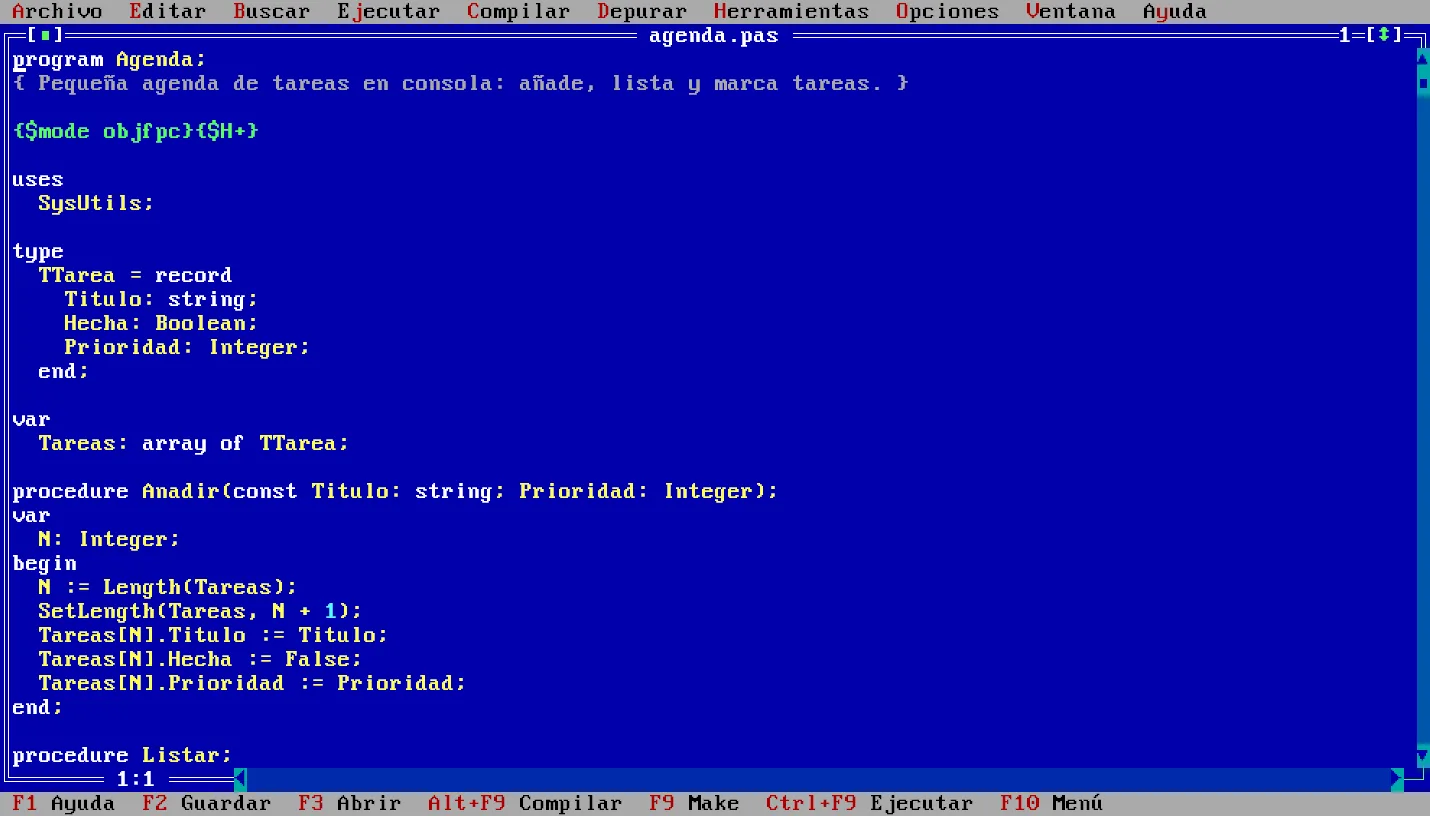
ePasIDE95 is a text IDE for Free Pascal with the feel of the classic Pascal environments: menus at the top, double-framed windows, function keys and a user screen. Unlike those, it works in its own window with Unicode, free resizing and 64-bit programs. It also compiles for MS-DOS, and it can be driven by an AI assistant.
How it works
The interface is built with the Unicode version of Free Vision, Free Pascal's text windowing library. Instead of painting it in the console, ePasIDE95 draws it in a Windows window with its own video, keyboard and mouse driver: that way every key arrives, the window can be resized, Ctrl+wheel changes the font size and Alt+Enter switches to full screen. The font is a 9×16 VGA-style one, with GNU Unifont for the characters it lacks.
Compiling calls Free Pascal out of process, translates its messages into Spanish and jumps to the error line. Running opens the program in a pseudo-console with an in-house terminal interpreter, so its output stays on the user screen (Alt+F5). Debugging talks to GDB through its machine interface, and the help turns Free Pascal's official CHM files into navigable text inside the IDE.
For MS-DOS it uses eRetroRAD's cross compiler and emulator. The MCP server, over standard input and output, gives an AI assistant tools to read, write, compile, run, debug and look up the help.
Main features
- Editor with Pascal syntax highlighting and line marks for errors, breakpoints and execution.
- Compile and Make with messages in Spanish and Enter to jump to the error.
- 64-bit and 32-bit Windows and MS-DOS targets, with a
Crtunit on MS-DOS too. - TP mode for compiling old code with
Crt,Dos,Graphand objects. - Debugger: breakpoints, step by step, run to cursor, watches, evaluate and call stack.
- Free Pascal help with links; Ctrl+F1 opens the topic for the word under the cursor based on the units in use.
- Classic blue, dark and light themes.
- Portable settings next to the executable; on exit it saves the desktop and reopens the files.
- MCP server with compile and run tools for MS-DOS too, including an emulator capture.
Technology
Written in Free Pascal (main branch) with Unicode Free Vision and an in-house driver on the Windows API: GDI for drawing, a thread for the window and ConPTY for the user screen. Debugging uses a 64-bit GDB and the retro targets use eRetroRAD's tools. It uses the PxPlus IBM VGA and GNU Unifont fonts, each under its own licence.
Limits
Code that touches PC hardware (Mem[], Port[], absolute, inline, overlays) does not work on Windows: it has to be compiled for MS-DOS. The program being debugged has its own console window, not the user screen. GDB does not display a whole record with string fields properly, so each field has to be requested.
Requirements
Not part of the app: installed separately from their official websites, each under its own licence.
- Free Pascal 3.2.2
- 64-bit GDB for debugging
- eRetroRAD MS-DOS cross compiler and emulator, only for that target
In the same category
 eRRAD
Visual RAD environment for Rust + egui.
 eRetroRAD
Free Pascal RAD IDE with several platforms in one: MS-DOS, Windows x64, Android and Linux x64. A single MCP server for all of them.
 eFlutterRAD
Delphi-style RAD for Flutter: forms designed with the mouse over real widgets, a property inspector and events created in your code.
 eDOSRAD
RAD IDE for MS-DOS (386+) programs in Free Pascal: text mode or VGA/SVGA graphics with mouse, data tables, reports and QEMU with FreeDOS.