
eLogica
From logic gates to your own CPU: circuit editor and simulator with tests, plus the ASH-16 CPU with assembler and debugger.
What it is
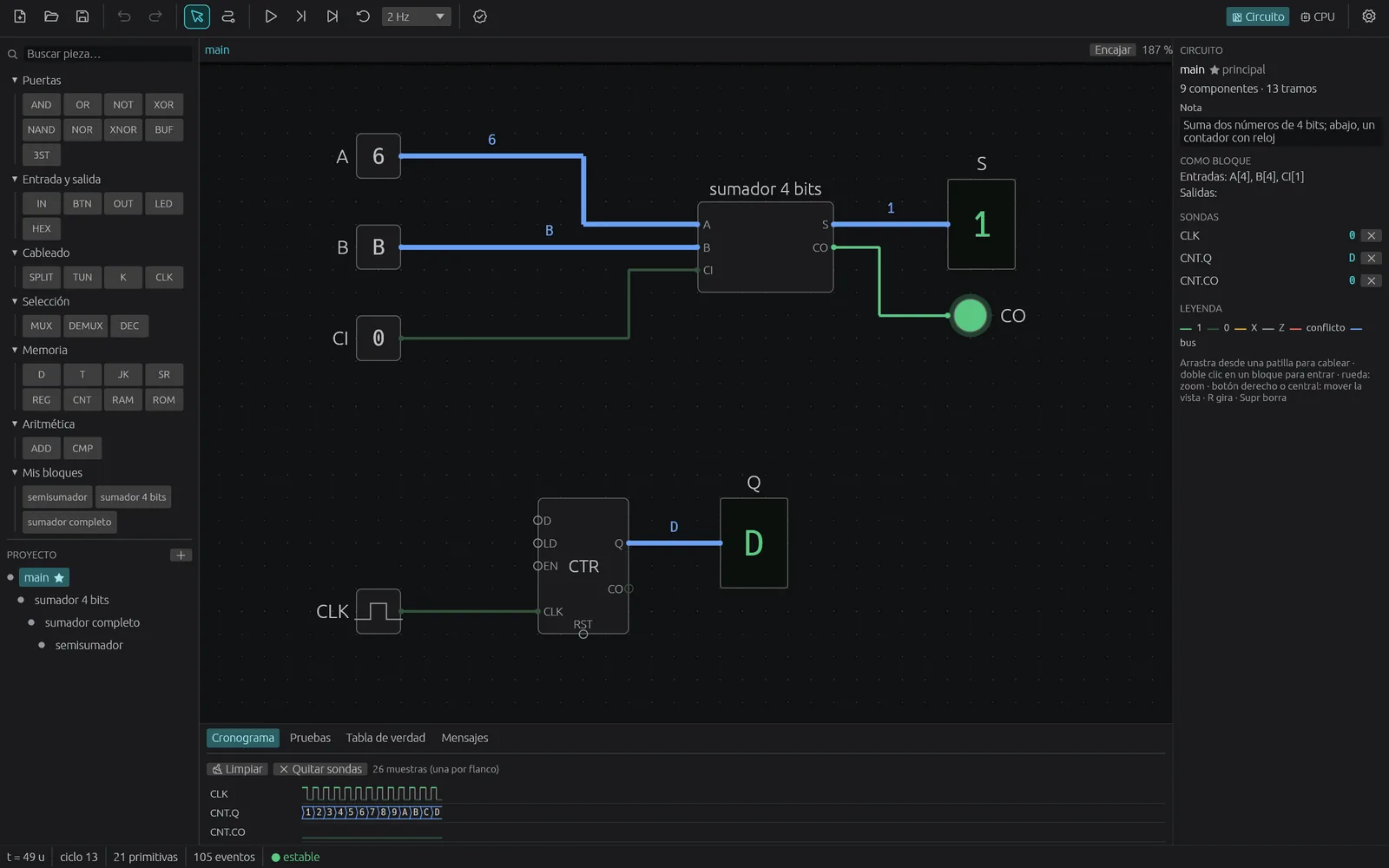
eLogica is a digital circuit editor and simulator for travelling the road from logic gates to a CPU. You draw circuits, test them with tables and reuse them as blocks. The same window holds ASH-16, a 16-bit reference CPU with its assembler and debugger. The interface is in Spanish and English.
How it works
The program is split into three parts:
- Core: the circuit model, the project format, the nets and the simulator. It knows nothing about the interface.
- ASH-16: the instruction set, the machine, the assembler and the disassembler.
- Interface: the canvas, the panels, the CPU view and the API for assistants.
The simulator is event-driven with unit delay: it only recalculates what changes, so glitches and oscillations become visible. Values have four states (0, 1, undefined and high impedance) on buses of up to 32 bits. Before simulating, the circuit is flattened to bits: splitters and tunnels are treated as joins. If a net does not settle within an event limit, it is flagged as oscillating.
A project is a single readable JSON file with all the circuits, their tests and the CPU program. Without a file, the app opens an example that goes from a half adder to a 4-bit adder with a counter, plus a program that says hello and moves a dot around the screen.
Main features
- Canvas with grid, zoom, box selection, copy and paste, undo and L-shaped wires that join at their ends and in T junctions.
- Library of 2- to 8-input gates, tri-state buffers, inputs, push buttons, clock, LEDs, hex display, multiplexers, decoders, flip-flops, registers, counters, RAM, ROM, adders and comparators.
- Any circuit in the project can be used as a block; double-click to enter it and breadcrumbs to go back.
- Clock by half cycle, by cycle or free-running, and a timing diagram with probes.
- Tests as input and output tables, also per clock cycle, with "Run all" and status shown in the project tree.
- Automatic truth table that can be saved as a test.
- ASH-16: eight registers, 64 K words, about 35 instructions and memory-mapped I/O with a 128×96 screen, keyboard, terminal, LEDs and switches.
- Two-pass assembler with labels, expressions, directives and pseudo-instructions, with errors in both languages.
- Debugger with breakpoints, stepping, highlighted registers, disassembled memory and stack.
- Optional control by an AI assistant (off by default): read and create circuits, simulate, write tests and run programs.
Technology
Rust in three crates: core, CPU and interface. The interface uses egui with the house theme; projects are stored as JSON with serde. It is portable: settings are kept next to the executable.
Limits
ASH-16 runs as an instruction-level model: it cannot yet be built from blocks and compared cycle by cycle with the reference. There are no guided lessons and no export to image. Editing a circuit rebuilds the simulation, so probes and flip-flop state are lost.
In the same category
 eCie10Tutor
Learn to code with ICD-10-ES (Spanish edition of ICD-10: diagnoses and procedures).
 eAnatomia
Topographic anatomy study tool: levels, regions, planes, directions and positions, with diagrams and a final test.
 eCienciasESO
Maths, Physics and Chemistry review for Spanish secondary school (2nd and 3rd ESO), with theory, exercises and labs.
 frenchi2me
French for travelling: lessons, readings, pronunciation and a voice translator.