
eAudioVideoMux
Moves the audio track from one video to another into an MKV, with delay, automatic sync detection and AAC/AC3 conversion.
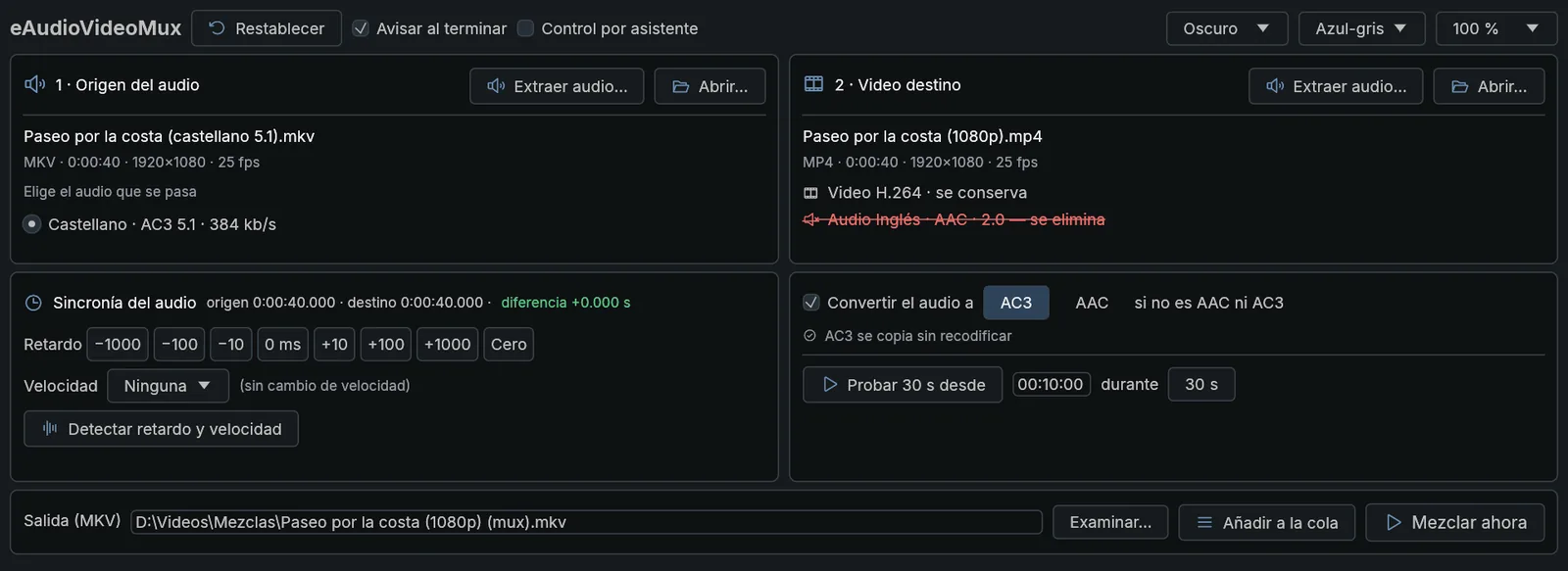
What it is
eAudioVideoMux moves the audio from one video to another and saves everything as an MKV. The typical case: one version with a better picture and another with the dubbed soundtrack you want to keep. The app takes the picture from one and the chosen audio from the other, and helps keep them in sync, even when the two versions run at different speeds.
How it works
The target video is not re-encoded: it is a remux, fast and lossless. Its picture, the chosen subtitles, chapters and attachments are kept, and all its audio tracks are removed. The new track is copied as it is if it is already AC3 or stereo AAC; otherwise it is converted to AAC or AC3.
To synchronise, the app compares the envelope of the target's original audio with that of the chosen audio at several points in the video. With three points it suggests a delay and warns if the result is unreliable or if the offset changes along the video. With four points it fits a straight line: the slope gives the speed and the intercept, the delay. This picks up the usual differences between versions at 25, 24 and 23.976 frames per second.
Before muxing you can test a clip with the same settings in its own window with picture and sound, and correct the delay in steps of 10 or 100 ms; the clip is regenerated instantly. All the heavy lifting is done by ffmpeg and ffprobe in separate processes, which end with the app if it closes abruptly; half-written files are cleaned up at start-up.
Main features
- Remux to MKV without re-encoding the video, with a choice of source audio track.
- Conversion to AAC (stereo) or AC3 (up to 5.1) only when needed.
- Delay in milliseconds with fine and coarse adjustment buttons.
- Automatic detection of the delay, and of delay and speed together.
- Audio speed adjustment by preset, from durations or manually, keeping the pitch or letting it change.
- Preview with a built-in player and live delay correction.
- Choice of subtitles (Spanish by default) and output without unnecessary metadata.
- Batch mux queue with time remaining per item and in total.
- Audio extraction as a separate track, as it is or converted to MP3.
- Sound alert when finished and optional control from an AI assistant.
Technology
Rust with egui (eframe on OpenGL) and the house's shared theme. Envelope comparison uses FFT with rustfft, and preview sound plays through cpal, with the picture decoded by ffmpeg. It is portable: settings and the pending queue are stored next to the executable. Single instance, drag and drop onto each panel and output files that never overwrite an existing one. The AI assistant can load videos, adjust, detect and mux, but cannot empty the queue or change folders.
Limits
Automatic detection needs the target video to have some audio to compare against. Changing the speed requires re-encoding the audio. Conversion to AAC always produces stereo: surplus channels are mixed down. The result is always an MKV.
Requirements
Not part of the app: installed separately from their official websites, each under its own licence.
- ffmpeg, from ffmpeg.org
 eVideoPlay
Video player built on mpv with its own ModernZ interface.
 eVideoConv
Batch video converter to M4V (MP4) using ffmpeg.
 eHandBatch
Batch video conversion with HandBrakeCLI and your own HandBrake presets.