
eComerGes
Sales management web application that works out how much each representative earns and why, with a configurable rules engine, settlements and mobile use. It runs on Firebird 4.0 or SQLite thanks to an in-house data layer.
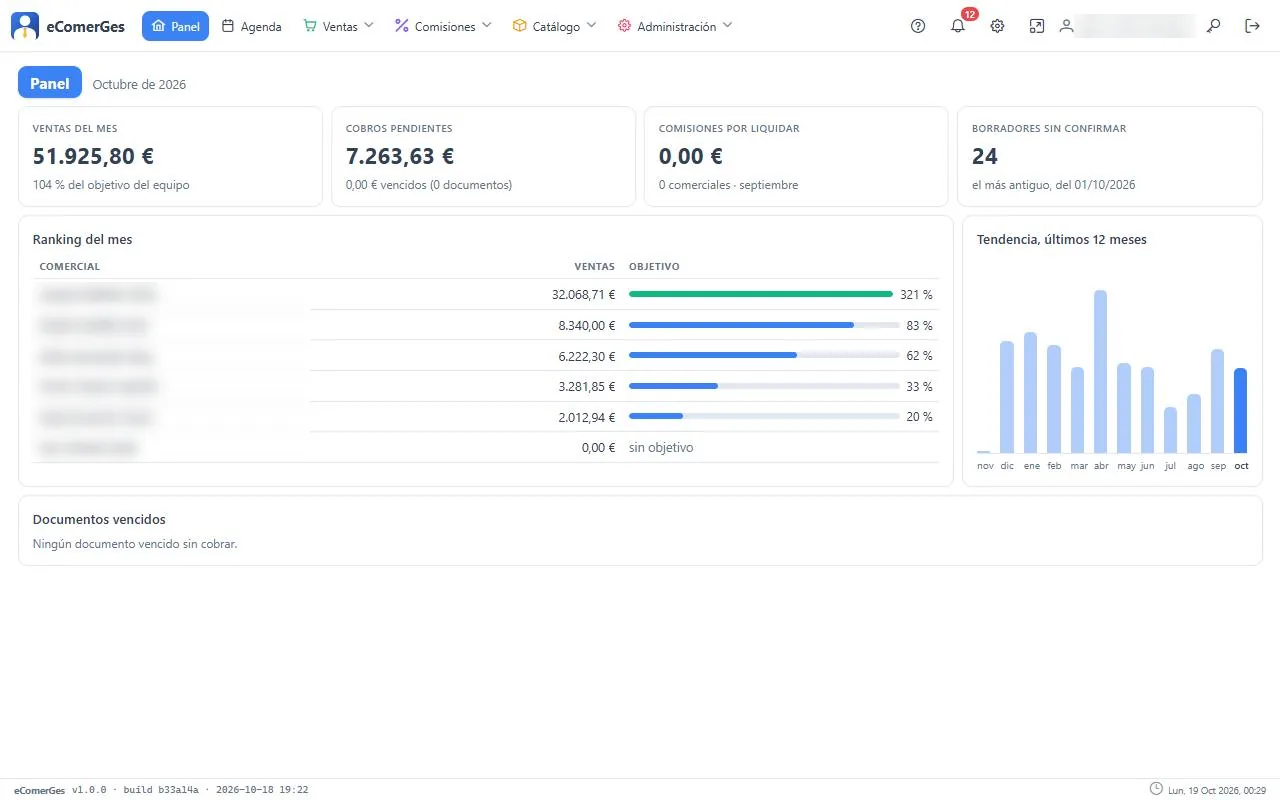
What it is
eComerGes is a web application for sales and commission management. It handles customers and their portfolios, sales representatives and their teams, the catalogue, sales and quotes, and above all it works out how much each representative earns and why, with a rules engine that is configured without touching code.
It is designed for a company with a sales network: the office defines the rules, closes the month and settles; the sales manager follows their team; and the representative sells from a phone, sees their targets and knows on every line how much commission they will keep. The interface is in Spanish, with Spanish formatting for amounts, dates and periods.
How it works
The application has two parts. The server is a REST API in NestJS that uses no ORM: it talks to the database through fbdata, an in-house data layer that reads the table structure and provides queries, transactions and migrations. The client is a single-page Angular application.
fbdata is multi-engine: the engine is chosen in the configuration. The default is Firebird 4.0; for a single workstation, SQLite in a file, with no database server. The business code contains no SQL specific to any engine, and the schema is described in portable migrations with logical types (identifier, amount, percentage, enumeration…) from which each engine derives its own DDL. A single command copies the data from one engine to another.
The heart of it is the commission calculation, with two models per representative:
- Per line: when a sale is confirmed, each line looks for the most specific rule (by representative, customer, product family or product, with a priority to break ties) and is commissioned within the same transaction that confirms it.
- Per period: commission is calculated on the representative's total confirmed sales for a month, quarter, year or range, without paying twice for what was already commissioned per line.
Each rule combines four axes: the base (gross, net, margin or units), the rate (percentage, tiers, fixed amount or formula), the metric that drives the tiers, and the penalty for discounts beyond the product's maximum. Pending commissions are grouped into settlements, which produce the self-billed invoices to the representative.
Modules
- Authentication: creation of the first administrator, sign-in, password change and session details.
- Users: accounts, role, extra permissions and link to the representative's record.
- Sales representatives: records with tax details, default percentage, commission mode and team manager.
- Customers: portfolio per representative, with a 360° record and notes.
- Product families: grouping of the catalogue.
- Products: catalogue with price, cost, maximum discount and images.
- Sales: drafts, confirmation, cancellation, duplication and yearly numbering.
- Commission rules: per-line rules with selectors, tiers, fixed amount or formula.
- Commissions: calculated commissions, summary and preview before selling.
- Period commissions: rules and calculation on the period's aggregate.
- Settlements: grouping and payment of commissions per representative and period, also in batches.
- Documents: quotes, pro forma invoices and self-billed commission invoices in PDF, with follow-up and collection.
- Company: organisation details, trading name, alert thresholds and visibility options.
- Export: output of documents and journal entries to other programs.
- Diary: visits, calls and events per representative, in month, week, day and list views.
- Audit: a record of who did what and when.
- Targets: sales goals per representative and month, with their progress.
- Dashboard: a different summary for the representative and for the office.
- To-dos: customers with no purchases, unanswered quotes and overdue documents, with the option to postpone.
- Import: customers and products from CSV, with a prior review.
Main features
- Configurable commission engine, with an assistant that turns natural-language sentences («if … then … otherwise …») into formulas.
- Warning while selling: if a line's discount exceeds the maximum, the screen shows how much the commission drops.
- Quotes with states (sent, accepted, or rejected with a reason) and conversion into a sale.
- Product gallery with a basket and a step-by-step sales assistant.
- 360° customer record: year totals against the previous year, last purchase, collections, next visit, documents and «repeat last order».
- Guided assistants: month-end close (drafts, period commissions, settlements, self-billed invoices and export), a new representative with user and rule in one go, initial set-up and the sales visit.
- Mobile use: bottom bar (Today, Customers, New sale, Dashboard), sale lines as cards and a draft that survives reloads and session expiry. It installs as a web app.
- 16 export formats: CSV, Excel, Facturae and the import formats of several invoicing and accounting programs common in Spain, with double-entry journal entries.
- Help on every screen, filtered by role, with F1; a welcome tour per role and an HTML and PDF manual generated from that same help, which warns when a screen changes and its help does not.
- Validation next to the field (NIF, NIE, CIF, email, postcode, telephone) and a warning before discarding changes.
Security and quality
There are four roles (administrator, office staff, sales manager and sales representative) and 19 per-action permissions, with individual permissions that can be added to a user. Reads are limited by scope: the office sees everything, the manager sees themselves and their team, and the representative sees only their own. The representative confirms their sales but does not cancel them; the manager cancels their team's sales and does not touch rules, settlements or users. Cost and margin only reach those with permission. The interface hides whatever the role cannot do.
An audit log records who confirms, cancels, settles, pays or changes rules, users or company details.
Protections:
- Public sign-up only creates the first user; after that, administrators handle accounts.
- Lockout after five failed sign-in attempts; eight-hour sessions that are invalidated when the password, role or status changes; the last administrator cannot be removed.
- Outside development, the server requires a long JWT secret.
- Confirming and cancelling lock the row; sales and document numbering is serialised, and a settlement never pays the same commission twice.
- Strict request validation, limits on discounts, taxes and quantities, and formulas evaluated with a library free of the original's vulnerabilities.
- Database errors translated into readable messages instead of generic failures.
The work came from an in-house audit carried out in phases, all of them closed. There are Jest tests for the engine, the tiers, the permissions and the scope, and two suites that create data against a copy of the database: one for concurrency (simultaneous confirmations, numbering, settlement) and another for permissions.
Technology
Server in TypeScript with NestJS 11 on the in-house fbdata layer, with Firebird 4.0 or SQLite. PDF documents with pdfkit and Excel sheets with ExcelJS. Interface with Angular 21 without zone.js, state in signals and PrimeNG 21, with light and dark themes. On Windows it is packaged as a portable folder or as a single executable that serves the API and the interface from the same origin and includes verified backups, a scheduled daily backup and start-up with the system.
Limits
It does not issue tax invoices: quotes and pro forma invoices are commercial documents, and the invoice is issued by the company's own system. It works with a single organisation per installation. The data layer has an adapter for PostgreSQL, but normal use is Firebird or SQLite. Tables load every record: they do not yet paginate on the server.
 GMAO
Web application for industrial maintenance management: assets, work orders, automatic preventive maintenance, spare-parts store and purchasing. Every job is linked to its equipment and feeds the availability, MTBF, MTTR and cost indicators.