eMusicCat
Music catalogue: reads tags without modifying them, fetches missing covers from MusicBrainz, several catalogues with merging.
What it is
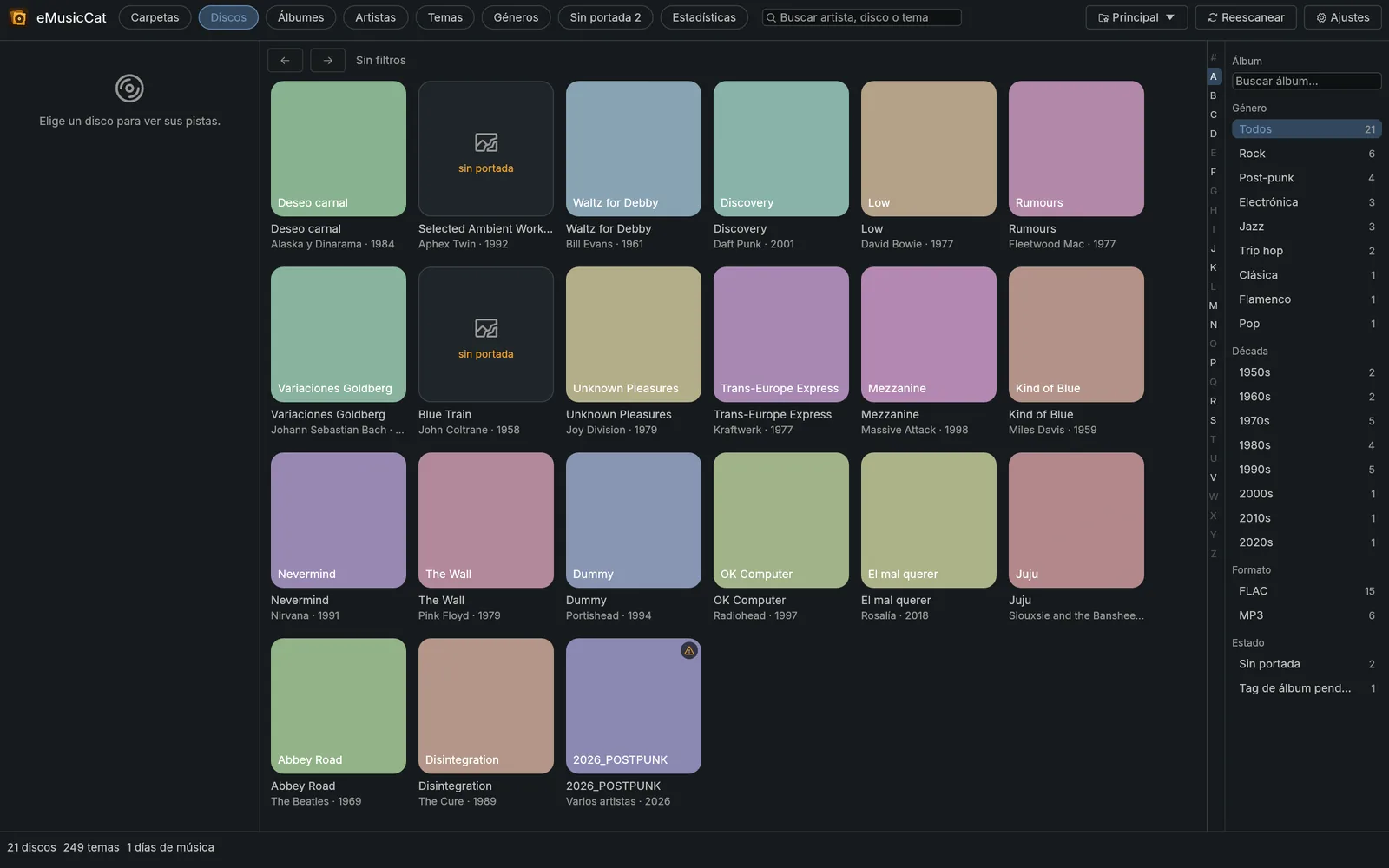
eMusicCat is a catalogue for a music collection that is already organised in folders. It reads the tags of every file, groups the discs and lets you browse the collection by folders, discs, albums, artists, tracks or genres. Its golden rule: music files are never modified — not their tags, not their names, not their location.
How it works
The scan walks the folders of a catalogue on several threads and opens the tags read-only with lofty: FLAC, MP3, M4A, OGG, OPUS, WAV, AIFF, APE, WV, AAC and WMA. The rule is simple: one folder is one disc, and CD1/CD2 subfolders are merged into the disc that contains them. The name comes from the album tag shared by most tracks; if a track names a different album, it stays in its folder and is flagged as «tag pending», with nothing corrected. A folder holding other discs is a container, and its loose files are shown separately.
The cover is taken from the folder image (cover, folder, front…) or from the one embedded in the file. Thumbnails, settings and records live in a datos folder next to the executable: the app is portable.
The only thing eMusicCat ever writes into the music is a cover.jpg, and only when you confirm it. If there was one already, it is set aside under another name; no image is ever deleted.
Main features
- Tabs for Folders (a tree of every catalogue with breadcrumbs and cards), Discs with an A-Z strip, Albums, Artists, Tracks, Genres, Without cover and Statistics.
- Filters that stack as chips, accent-insensitive and per-field search (
album:,artista:,genero:), back and forward navigation, and multi-disc selection. - The quality of each disc at a glance, for example «FLAC 24/96» or an MP3's bitrate.
- Missing covers from MusicBrainz and the Cover Art Archive: they are downloaded separately, shown in a preview and only copied into the folder after confirmation.
- Manual covers: pick a file, paste it from the clipboard or drag it onto the window, always with confirmation.
- Several catalogues: one main catalogue and others that can be merged into it, adding new discs and replacing duplicates with the better-quality copy. Only records are merged; files are neither copied nor moved.
- Play a disc, a folder, a selection or the filtered results in eAudioPlay, or in the system player with an
.m3u8playlist. - Statistics: discs, tracks, duration, size, lossless discs and breakdowns by decade, format and genre.
- Control by an AI assistant through eHub, off by default: status, search, a disc's details and sending it to the player.
Technology
Rust with egui and the house theme. Tags are read with lofty, images with image, MusicBrainz queries go through ureq and data is stored as JSON. One window per data folder.
Limits
It does not edit tags or rearrange files: if a tag is wrong, it only points it out. It relies on a folder structure that is already organised. The cover search needs a connection and respects MusicBrainz's pace of one request per second.
In the same category
 eAudioPlay
Quality-first audio player with bit-perfect playback, DSP, analysis and conversion to FLAC and MP3.
 eMusicDone
Sample-based multitrack music production with a built-in library.
 groovebox
Groovebox with drum machines and synthesizers, pattern sequencer and example songs.
 eDeckSoundBox
4-track tape recorder with drum machine (classic-style drums and acid bass): punch-in, varispeed, razor and splice, tape character, bounce and WAV export.