eRetroRAD
Free Pascal RAD IDE with several platforms in one: MS-DOS, Windows x64, Android and Linux x64. A single MCP server for all of them.
What it is
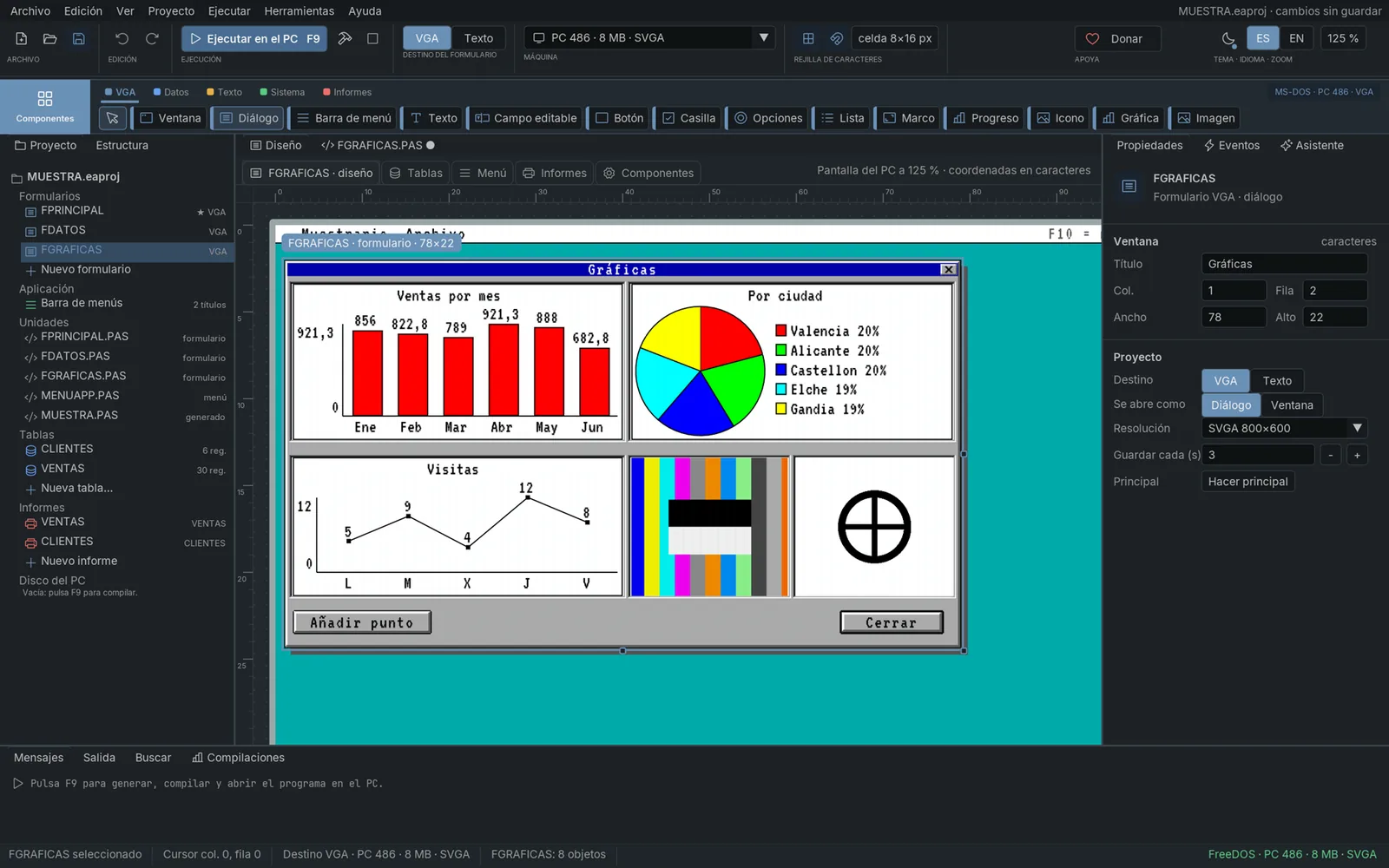
eRetroRAD is a rapid application development (RAD) environment in Free Pascal for building native programs for very different systems in the same way: draw forms, bind them to data tables and write only the event code. It brings MS-DOS, Windows x64, Android and Linux x64 together in a single IDE.
The eDOSRAD, eWin64RAD and eLinuxRAD IDEs are editions of this same program with only some of the platforms. eRetroRAD carries all of them and a single MCP server to drive them.
How it works
The IDE is shared, and each platform is a module that contributes its machines, how its screen is drawn, how it is compiled, which emulator or launcher tests the program and how it is exported. The designer and the palette show only what the project's platform supports.
The project is saved as readable text (JSON). On pressing F9, a generator writes the Pascal program with marked regions that the IDE maintains, without touching the user's code, compiles it with that platform's Free Pascal and opens it in its emulator or on the test machine.
Every action goes through a single command layer: the menu, the shortcuts and the MCP server do the same thing. An AI assistant can create projects, change forms and code, compile and run, and it receives a capture of the program's screen.
Pieces are described in component packages that the IDE reads at start-up, so they are installed without recompiling it.
Main features
- One IDE for MS-DOS, Windows x64, Android and Linux x64.
- Per-platform form designer: MS-DOS text or VGA, and ImGui windows on Windows, Linux and Android.
- Data tables with B-tree indexes, using the same engine in the IDE and in the program; master-detail, lookups and bound grids.
- Application menus and banded reports with groups, subtotals and preview.
- Code editor with go to declaration (Ctrl+click), compiler errors that jump to the line, and generated regions.
- Debugging with the exact line of the error, call chain, breakpoints and variables, depending on the platform.
- Dockable panels with per-task layouts, light, dark and Midnight themes, and a Spanish and English interface.
- Components screen to install, review and retire piece packages.
- Requirements window that says which tool is missing, its licence and where to get it.
- Single MCP server and a local AI assistant inside the IDE.
Technology
The IDE is written in Free Pascal without Lazarus, with Dear ImGui (through cimgui) on SDL2 and OpenGL. The wrapper that tests MS-DOS programs in QEMU with FreeDOS is written in Rust. The libraries that go inside the generated programs are MIT-licensed.
Limits
Each platform has its own pieces: not everything available on Windows exists on MS-DOS. Cross compilers and emulators are not part of the IDE: they are obtained from the requirements window. Android also needs its development kit.
Requirements
Not part of the app: installed separately from their official websites, each under its own licence.
- Free Pascal 3.2.2 and each platform cross compiler
- QEMU with FreeDOS to test MS-DOS programs
- Android SDK, NDK and JDK for Android
In the same category
 eRRAD
Visual RAD environment for Rust + egui.
 ePasIDE95
Classic-style text IDE for Free Pascal: syntax-highlighting editor, compile and jump to error, GDB debugger, FPC help, an MS-DOS target and an MCP server.
 eFlutterRAD
Delphi-style RAD for Flutter: forms designed with the mouse over real widgets, a property inspector and events created in your code.
 eDOSRAD
RAD IDE for MS-DOS (386+) programs in Free Pascal: text mode or VGA/SVGA graphics with mouse, data tables, reports and QEMU with FreeDOS.