
What it is
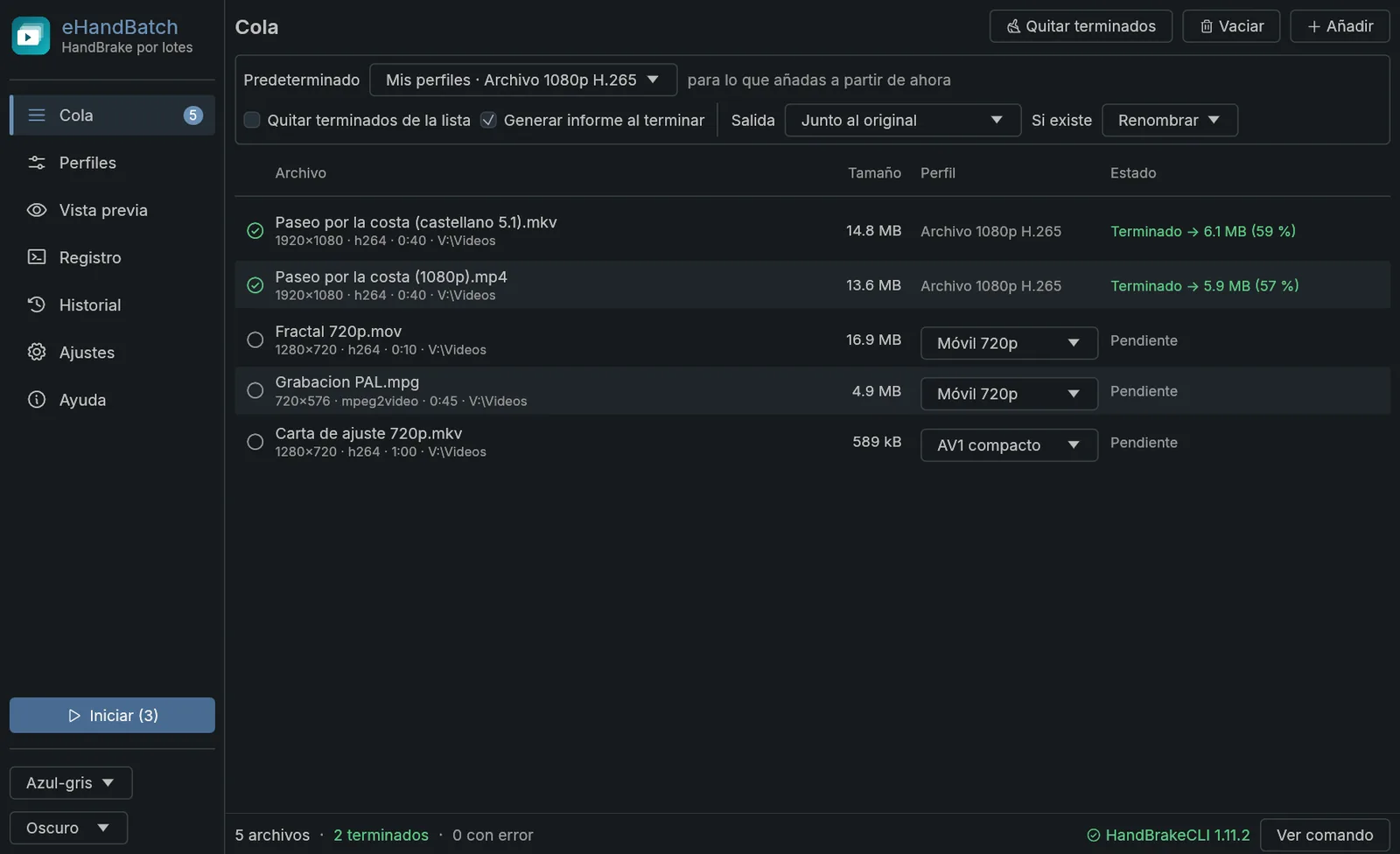
eHandBatch is a batch interface for HandBrakeCLI, the command-line version of the well-known video converter. Anyone who already has their presets fine-tuned in HandBrake can use them as they are to convert a long list of videos, with a clear queue, preview and log, without typing commands by hand.
How it works
The first time, the app copies the user's HandBrake presets; a button lets you re-import them later. When adding videos, you choose the preset in a dialog, each row in the queue keeps its own and there is a default preset. If a video is already on the list, it asks whether to change its preset, skip it or duplicate it.
A thread works through the queue one item at a time: it scans each video, runs HandBrakeCLI with that row's preset and turns its JSON output into progress in the interface, even with two-pass encoding. The result is first written as a temporary file and never replaces the original. If the app closes badly, the HandBrakeCLI processes end with it instead of carrying on encoding in the background, and registered temporary files are cleaned up afterwards.
The command line accepts files, folders and options (preset, output folder, start, close when finished). With a window already open, the arguments are passed to it.
Main features
- Uses your own HandBrake presets (also imported from a file), with a preset per video and a default preset; built-in presets can be shown or hidden.
- Video queue: add files or folders (with optional subfolders), drag and drop, or from the command line.
- Preview of a clip with the chosen preset, from the point and for the length you specify, with an estimate of the final size and time.
- Own output folder or next to the original, a name suffix and what to do if the result already exists.
- Option to remove finished videos from the list.
- HTML and CSV report when the queue ends, and a conversion history.
- Live log window and a rotating log file.
- Low priority so the computer stays usable while encoding.
- When finished: do nothing, close, sleep or shut down, with a 60-second margin to cancel.
- Optional control from an AI assistant: view the queue and presets, add videos, start and cancel.
Technology
Rust with egui (eframe on OpenGL) and the house's shared theme, with navigation through a side panel. The app does no encoding itself: it locates HandBrakeCLI, runs it as a separate process and reads its output. It is portable: configuration, presets, history and logs are stored in a folder next to the executable. Single instance. The AI assistant cannot remove items from the list, change settings or touch the original videos.
Limits
The quality and options of each conversion are those of the HandBrake preset: eHandBatch has no preset editor of its own. Presets are imported once; if they change in HandBrake, they need to be re-imported.
Requirements
Not part of the app: installed separately from their official websites, each under its own licence.
- HandBrakeCLI, from handbrake.fr
 eVideoPlay
Video player built on mpv with its own ModernZ interface.
 eVideoConv
Batch video converter to M4V (MP4) using ffmpeg.
 eAudioVideoMux
Moves the audio track from one video to another into an MKV, with delay, automatic sync detection and AAC/AC3 conversion.