eLinuxRAD
RAD IDE for Linux x64 programs (any distribution, glibc 2.28+) in Free Pascal with ImGui windows: runs on Linux or on Windows, testing over SSH on a Linux machine.
What it is
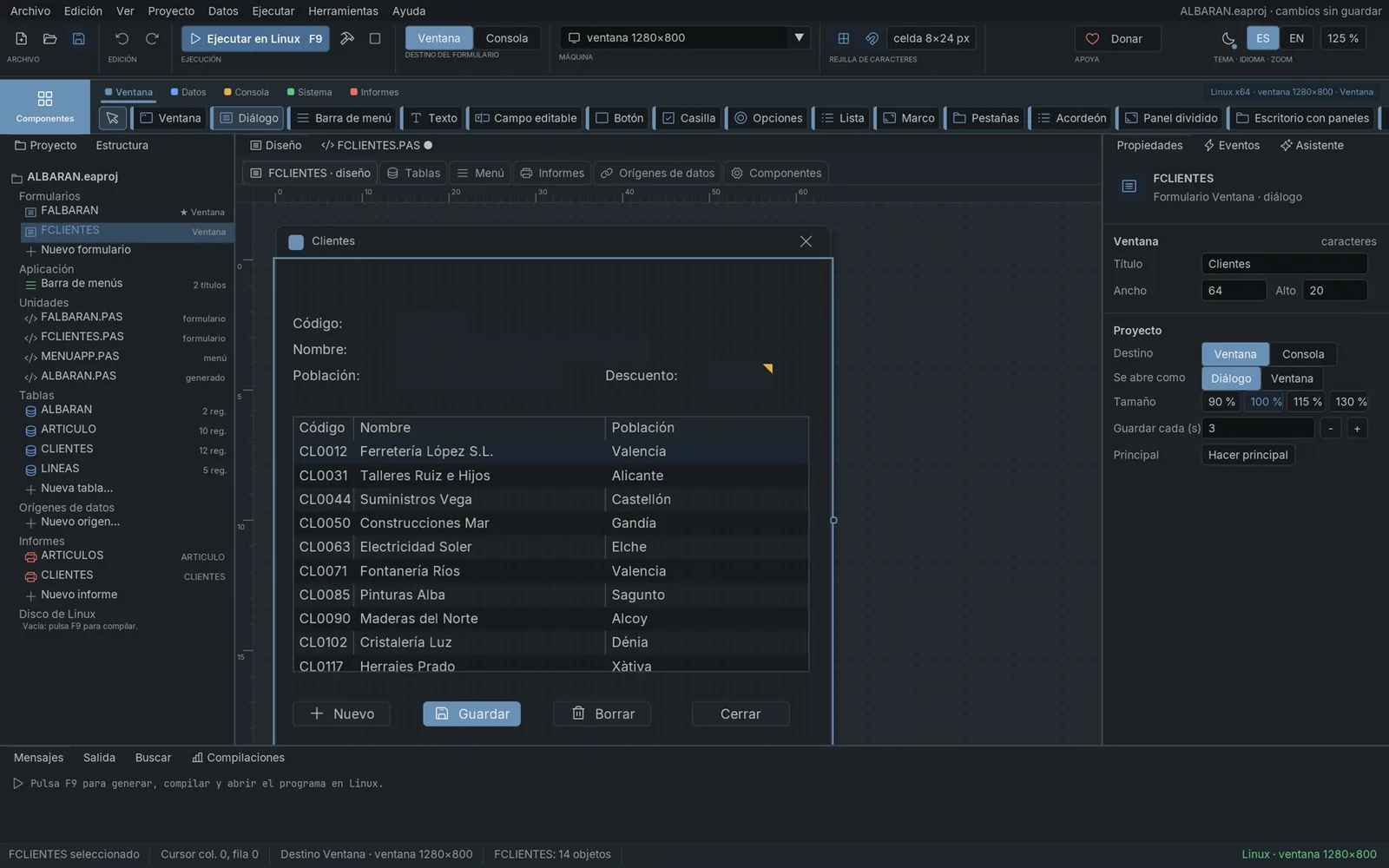
eLinuxRAD is the eRetroRAD edition for creating Linux x86_64 programs. Programs look like the IDE —Dear ImGui windows— and run on any distribution with glibc 2.28 or later, on X11 and Wayland. The IDE itself runs on Linux, where it compiles and tests on the same machine, and also on Windows, where it cross-compiles and tests on a Linux machine over SSH.
How it works
Programs use the same run-time library as eWin64RAD, with the Linux-specific parts handled separately. That is why a Windows project moves to Linux by changing only the machine, without touching the code.
Compatibility across distributions comes from compiling against a minimal glibc 2.28 root: what is compiled there runs on later distributions. The graphics layer is an in-house library with Dear ImGui and SDL2 linked statically, which only asks for OpenGL and the system's C library. The program looks for it alongside itself, so the exported folder is portable.
On Linux, the IDE package is unpacked anywhere and a script adds it to the menu without administrator rights. It carries its own Free Pascal, its linker and the glibc root, so it does not depend on what the distribution has installed. On Windows, F9 sends the program to the configured Linux machine over SSH, opens it on its desktop with the test script and brings the captures back.
Main features
- WYSIWYG designer with the same pieces as Windows: grids, tree, tabs, drop-down, date, ImPlot charts, gauge, colour picker and a desktop with panels.
- Firebird, PostgreSQL, MySQL/MariaDB and SQLite databases, with the client next to the program or the distribution's own.
- Reports with preview, PDF and printing through CUPS; without CUPS, save as PDF.
- In-house file selector, the same on every distribution, with no dependency on GTK.
- Light or dark theme taken from the desktop settings.
- Export a portable folder with its desktop launcher and a
.tar.gzthat keeps the execute permission. - Check on export of the glibc version required by the program and its libraries.
- Test machine configurable from the IDE, with a connection test that reports the distribution and the graphical session.
- MCP server so an AI assistant can compile, run and receive captures.
Technology
IDE and programs in Free Pascal 3.2.2 with Dear ImGui through cimgui, on SDL2 and OpenGL. To compile from Windows it uses GNU binutils built for that purpose, because Free Pascal's internal linker does not produce ELF. Databases use SQLdb and PDFs use fcl-pdf.
Limits
The Windows network pieces and step-by-step debugging are not available on Linux. SQL Server is not supported directly, only through ODBC with FreeTDS. Database passwords are not encrypted as on Windows: they are stored in plain text or asked for at start-up. When native Wayland is forced, windows appear without borders; by default the program runs through X11 or XWayland.
Requirements
Not part of the app: installed separately from their official websites, each under its own licence.
- Free Pascal 3.2.2
In the same category
 eRRAD
Visual RAD environment for Rust + egui.
 eRetroRAD
Free Pascal RAD IDE with several platforms in one: MS-DOS, Windows x64, Android and Linux x64. A single MCP server for all of them.
 ePasIDE95
Classic-style text IDE for Free Pascal: syntax-highlighting editor, compile and jump to error, GDB debugger, FPC help, an MS-DOS target and an MCP server.
 eFlutterRAD
Delphi-style RAD for Flutter: forms designed with the mouse over real widgets, a property inspector and events created in your code.