eDOSRAD
RAD IDE for MS-DOS (386+) programs in Free Pascal: text mode or VGA/SVGA graphics with mouse, data tables, reports and QEMU with FreeDOS.
What it is
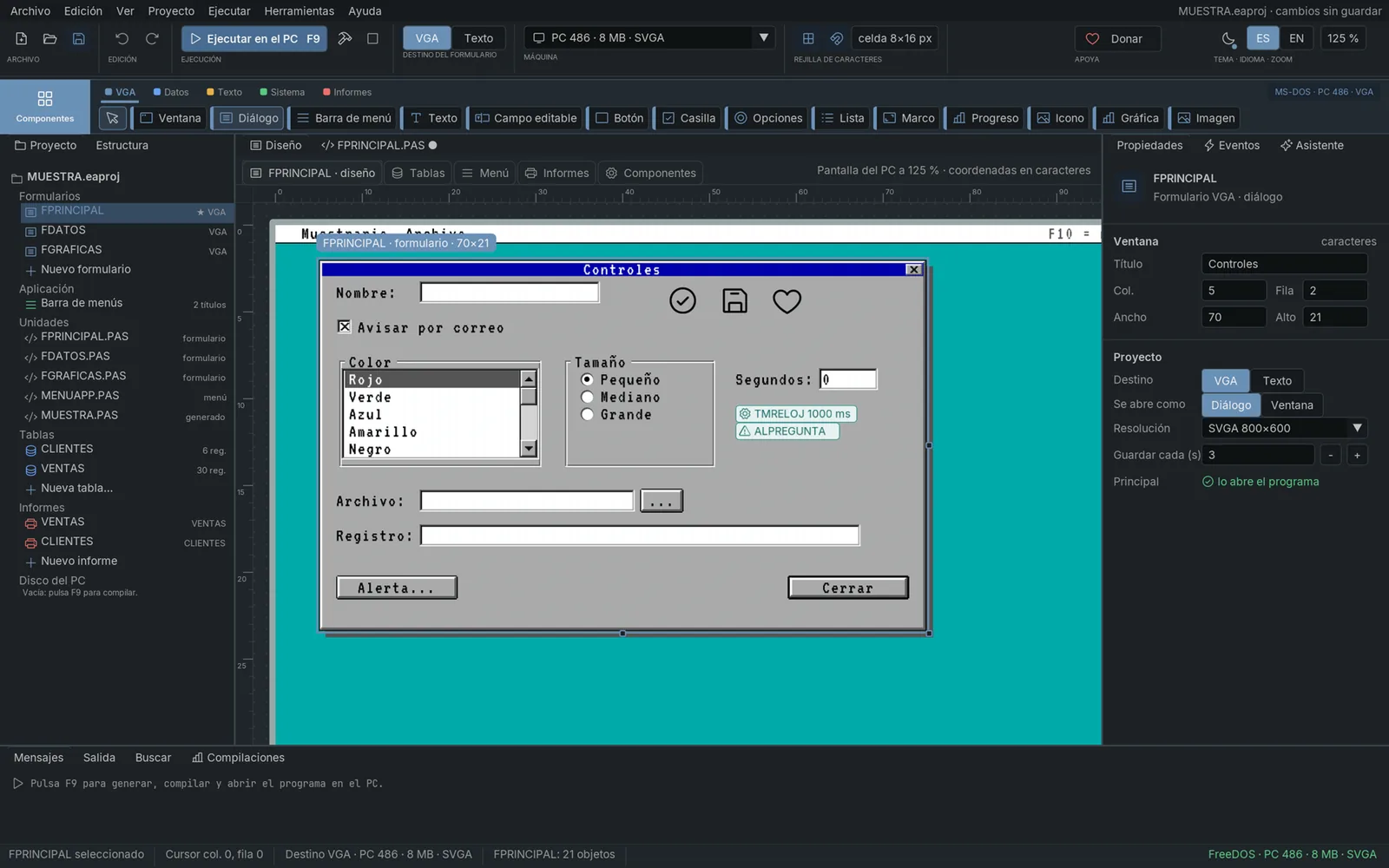
eDOSRAD is the eRetroRAD edition for MS-DOS. It creates 32-bit programs for 386 or later PCs, aimed at business tasks: record cards, grids, menus and printed reports. Each form can run in 80×25 text mode or in an in-house graphical interface with windows and mouse, in VGA or SVGA.
How it works
Programs are compiled with Free Pascal for the go32v2 target and run in protected mode with the CWSDPMI DPMI server, which is copied next to the executable. The project chooses a machine —a 386 PC with 4 MB and VGA, or a 486 PC with 8 MB and SVGA— and each form chooses its resolution: 640×480 VGA or 800×600 or 1024×768 SVGA.
The graphical interface is an in-house library that draws straight into video memory: a coloured desktop, raised grey windows with a title bar, raised buttons and sunken fields and lists. It only redraws the lines that change and uses the PC BIOS font, composing accented letters from it. The mouse comes through the standard MS-DOS driver.
For testing, F9 starts the program in QEMU with FreeDOS. A wrapper prepares the boot floppy, mounts the project folder as drive C: and talks to QEMU to send keys and mouse input, take captures and collect what the program prints. That way the MCP server and the automated tests work hands-free.
Main features
- Forms in text mode or in the VGA/SVGA graphical interface, with a resolution per form.
- Windows that can be dragged and closed with their close box, menus by keyboard (F10, Alt+letter) and mouse.
- Text, fields, buttons, check boxes, options, lists, grids bound to tables, master-detail and lookups.
- Charts and BMP images dithered to the screen palette.
- Data tables with B-tree indexes, the same engine the IDE uses to edit them.
- Banded reports with groups and subtotals to the printer (LPT1).
- Debugging: run-time errors with the line and call chain, plus breakpoints, stepping and variables through QEMU's debugger.
- Export for a real PC: folder and zip with the program, its data, its images and CWSDPMI.
- Absolute mouse inside QEMU so the pointer follows the PC's.
Technology
IDE in Free Pascal with Dear ImGui, shared with eRetroRAD. Programs use Free Pascal for go32v2 with an in-house step that fixes the COFF objects, so DJGPP is not needed. The QEMU wrapper is written in Rust and talks to QEMU through its control protocol and its GDB server. Testing uses QEMU and FreeDOS, which are downloaded from the IDE's requirements window.
Limits
Programs need a 386 or later and a DPMI server: they do not run on an 8086 or a 286. There are no sound or network pieces on MS-DOS, nor tabs, drop-downs or trees: those pieces belong to other platforms. Some antivirus software may flag a freshly compiled MS-DOS executable; it is a known false positive.
Requirements
Not part of the app: installed separately from their official websites, each under its own licence.
- Free Pascal 3.2.2 (go32v2)
- QEMU with FreeDOS or an MS-DOS machine
In the same category
 eRRAD
Visual RAD environment for Rust + egui.
 eRetroRAD
Free Pascal RAD IDE with several platforms in one: MS-DOS, Windows x64, Android and Linux x64. A single MCP server for all of them.
 ePasIDE95
Classic-style text IDE for Free Pascal: syntax-highlighting editor, compile and jump to error, GDB debugger, FPC help, an MS-DOS target and an MCP server.
 eFlutterRAD
Delphi-style RAD for Flutter: forms designed with the mouse over real widgets, a property inspector and events created in your code.